
Key Takeaways
- Gorgias auto-reply Rules send automated email responses based on business hours, scheduled holiday closures, Shopify shipping status, or snooze delays, and can also post internal agent notes.
- Before activating auto-replies, configure your workspace business hours, pre-schedule upcoming holiday hours, and connect your Shopify integration if automating order tracking inquiries.
- Across five steps, you configure business-hours email replies, isolate holiday auto-replies without overlap, build shipped and unshipped Shopify order replies, add intent-triggered internal notes, and review snooze follow-ups.
- Verify your setup by submitting test email inquiries and checking that the exact single expected auto-reply or internal note fires without triggering on Facebook or Instagram comments.
You can set expectations on response times and deflect repetitive order-status emails in Gorgias by configuring targeted auto-reply Rules for business hours, holiday closures, and Shopify tracking inquiries. Pairing customer-facing email replies with intent-based internal notes keeps shoppers informed without risking duplicate messages or social spam flags.
For plan limits and team seat pricing behind this workflow, read our Gorgias review or connect Gorgias to AI agents in Gorgias API and MCP.
Key steps
What do you need before starting in Gorgias?
Gorgias requires the following workspace setup before you begin:
- Admin or Rule-management access in your Gorgias workspace
- Configured workspace business hours and pre-scheduled holiday closure dates in Gorgias
- An active Shopify integration if you plan to automate order tracking and status URL replies
How do you complete the steps in Gorgias?
Follow these 5 steps in Gorgias in order:
Create during-business-hours and after-hours email auto-reply rules
Open Rules in Gorgias and create an automated response Rule set to trigger either During business hours or Outside of business hours so customers immediately know when your support team is available. Scope your Outside of business hours Rule strictly to email tickets that arrive outside business hours.
Never enable automated reply Rules on Facebook or Instagram comments, because repetitive automated replies on social channels can be flagged as spam. Restricting availability auto-responses to email tickets protects your connected social accounts while giving email senders clear turnaround expectations.
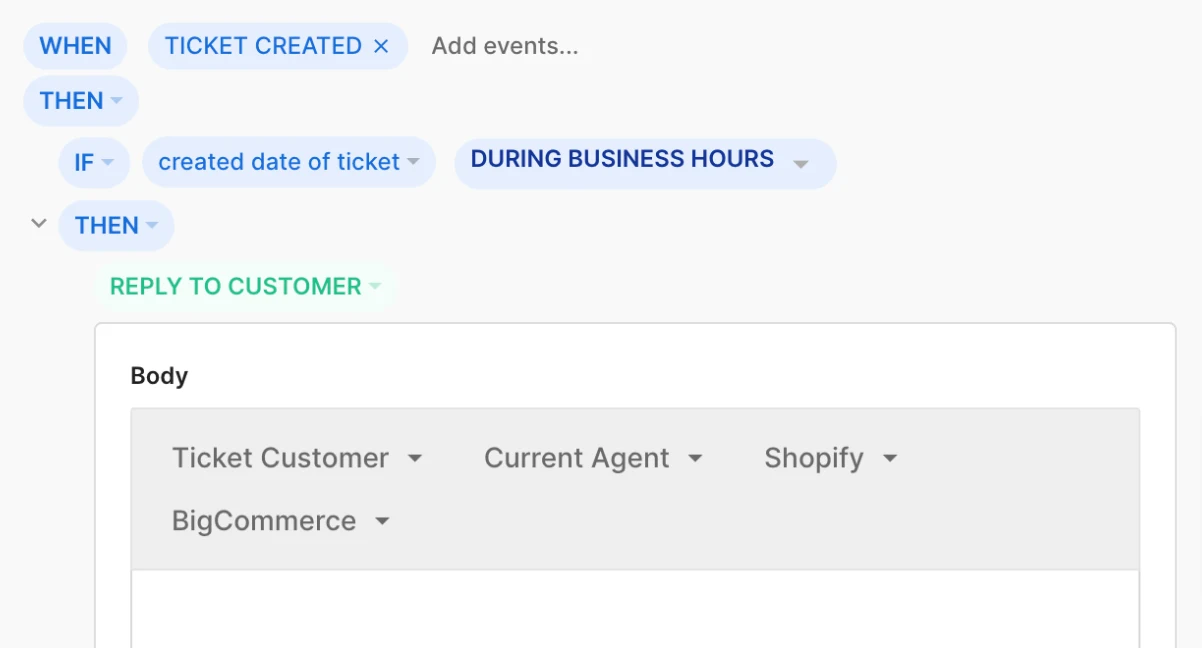
Verify the ticket creation trigger and business hours condition before saving your automated email response. Screenshot source Schedule holiday auto-replies and exclude holiday overlap
Schedule your team's holiday hours ahead of time, then create a dedicated Rule using the during holiday hours condition (or start from the During a holiday rule template), select the specific holidays the Rule applies to, and write a reply stating when your team returns. Next, open your Outside of business hours Rule, add the outside holiday hours condition, and select those exact same holidays.
Because any customer emailing during a holiday closure is technically also reaching out outside regular business hours, skipping that exclusion causes both Rules to fire back-to-back. Pairing during holiday hours on the holiday Rule with outside holiday hours on the standard after-hours Rule guarantees shoppers receive only the holiday return message.
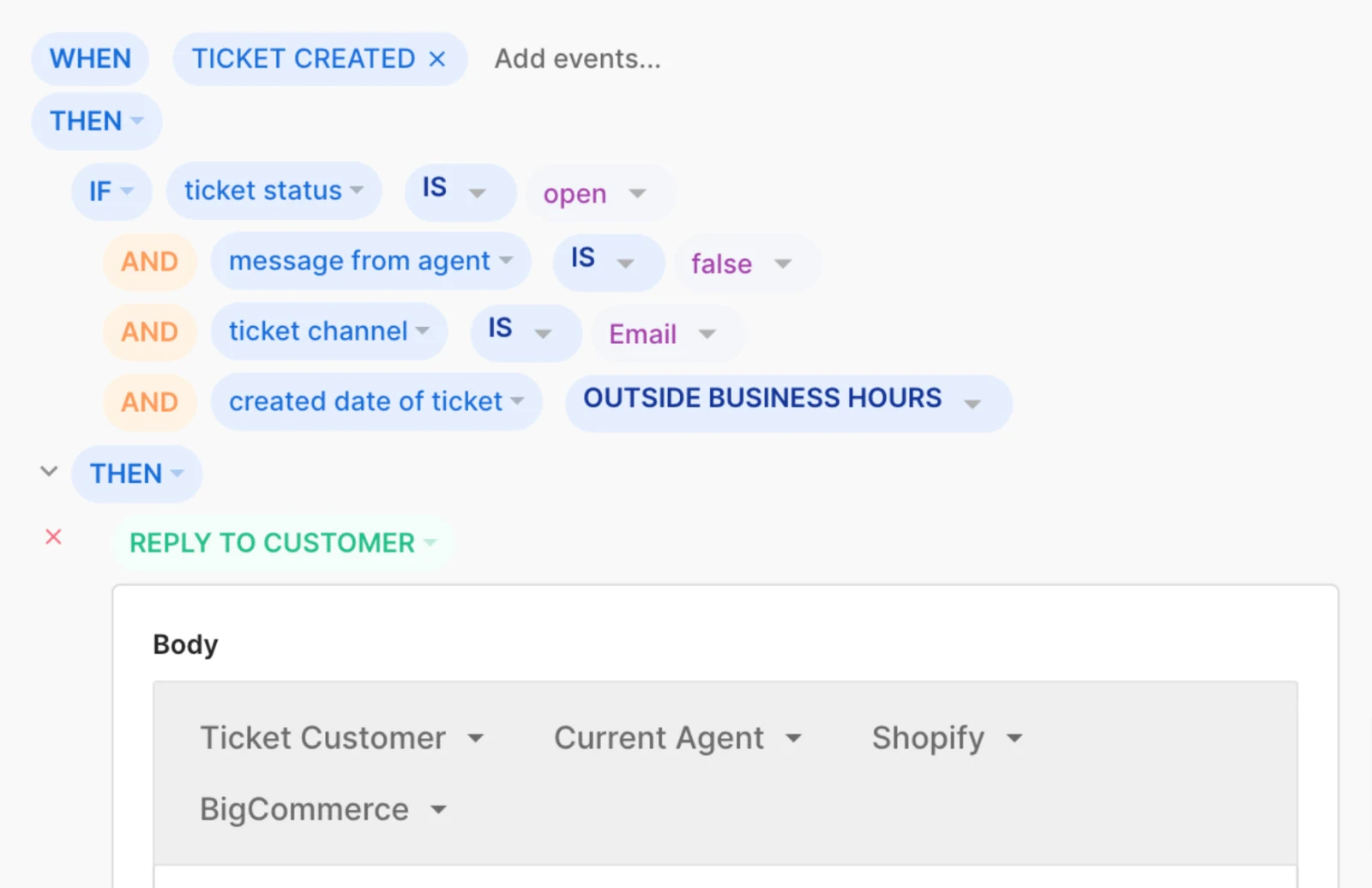
Confirm the rule targets email tickets outside business hours and add outside holiday hours when scheduling closures. Screenshot source Automate shipped and unshipped order inquiries with Shopify variables
Set up two complementary Rules using Shopify variables to answer common 'Where is my order' inquiries automatically based on fulfillment state. Build the first Rule for Order status auto-reply when the tracking number is available so shipped orders receive their tracking information immediately, and build the second Rule for Auto-reply when the tracking number isn't available to send the order status URL when an order has not shipped yet and has not exceeded processing time.
Splitting order-status automation by tracking availability prevents blank variable placeholders from going out to customers whose packages are still being packed. Orders that have already exceeded your normal processing window fall through to human agents instead of getting a generic status link.
Add intent-based internal notes for agent context
Create an internal Rule structured with WHEN a ticket is created, IF the ticket's intent contains one of your chosen intents (such as Promotion & Discount::Information), and THEN add an internal note. Write your guidance inside the Body field and use the variable menus directly above it, such as Ticket Customer or Current Agent, to insert dynamic ticket details automatically.
Internal note auto-replies surface promo policies, refund checklists, or customer context right inside the thread without sending anything externally to the shopper. Agents picking up the ticket get immediate policy reminders tailored to the detected inquiry intent.
Configure post-snooze follow-up or auto-close rules
Create a follow-up Rule inside Rules for snoozed tickets to automatically message clients once a snooze delay ends and auto-close tickets after that follow-up has been sent. Review the condition order across all your active auto-reply Rules and save your changes.
Automating post-snooze outreach keeps pending customer threads from stagnating in agent queues when shoppers forget to send requested photos or order details. If a customer replies later, the thread reopens naturally with full context intact.
How does this Gorgias setup work in practice?
Worked example: Preparing holiday and order-tracking auto-replies for a long weekend
An ecommerce support lead is preparing Gorgias for a three-day holiday closure while keeping automated Shopify tracking replies and promo guidance running.
| Choice | Why it matters | How to check |
|---|---|---|
| Enable During a holiday Rule for the closure dates and add outside holiday hours to the after-hours Rule | Tells email senders the exact Tuesday return time without double-sending the standard nightly after-hours message. | Both Rules list the exact same holiday dates in their respective conditions. |
| Keep separate Shopify auto-replies for tracking available vs tracking unavailable within processing time | Delivers instant tracking numbers for shipped parcels and order status URLs for recent unshipped orders. | Test order-status emails return either a live tracking number or status URL depending on fulfillment state. |
| Add an internal note Rule on intent Promotion & Discount::Information using Ticket Customer variables | Drops active holiday promo code eligibility rules privately into the ticket thread for returning agents. | Discount-related tickets display the internal policy note immediately upon creation. |
Shoppers emailing over the holiday weekend get instant tracking answers or a single accurate return-date reply, and agents return on Tuesday to pre-annotated discount threads.
How do you verify your result in Gorgias?
Send a test email inquiry and inspect the ticket timeline in Gorgias to confirm the expected auto-reply or internal note fires cleanly without duplicate messages. Next, pair your auto-reply setup with auto-tag Rules so incoming tickets sort into dedicated Views while awaiting agent follow-up.
| Step | What you should see |
|---|---|
| Create during-business-hours and after-hours email auto-reply rules | Your business-hours and outside-business-hours Rules appear active and restricted to incoming email tickets. |
| Schedule holiday auto-replies and exclude holiday overlap | The holiday Rule targets your selected holidays while the outside-business-hours Rule displays the matching outside holiday hours exclusion. |
| Automate shipped and unshipped order inquiries with Shopify variables | Both shipped (tracking available) and within-processing-time unshipped (status URL) auto-reply Rules are saved with populated Shopify variables. |
| Add intent-based internal notes for agent context | New tickets matching your selected intent automatically receive the formatted internal note populated with Ticket Customer variables. |
| Configure post-snooze follow-up or auto-close rules | Your snooze follow-up Rule is enabled alongside your availability, Shopify order-status, and internal-note Rules. |
Related Gorgias guides include How to configure custom auto-tag rules and ticket hygiene in Gorgias and How to create auto-tag rules from common templates in Gorgias.
Which official Gorgias sources were checked?
Every step and limit in this Gorgias guide was verified against official documentation on 27 Nov 2026 following how we check figures, alongside more walkthroughs in our Gorgias tutorials hub:
How do you troubleshoot common Gorgias issues?
Why did customers receive both our holiday auto-reply and our outside-business-hours auto-reply?
Tickets arriving during a holiday closure also qualify as outside regular business hours, so both Rules match unless you exclude holidays explicitly. Open your outside-business-hours Rule, add the outside holiday hours condition, and select the exact same holidays used in your holiday Rule.
Should we turn on outside-business-hours auto-replies for Facebook and Instagram comments?
No, Gorgias recommends scoping outside-business-hours auto-replies strictly to email tickets. Automated replies on Facebook and Instagram comments can be flagged as spam by the social platforms.
How do we avoid sending blank tracking numbers when automating 'Where is my order' replies?
Sending one generic tracking auto-reply causes blank variable placeholders whenever a customer asks about an order that has not shipped yet. Split order-status automation into two distinct Rules: one that triggers when the Shopify tracking number is available, and a second that sends the status URL when the tracking number is unavailable and processing time has not been exceeded.
 Reviewed byDanny Kirk
Founder of ReddiReach.
 Checked byAndrés Felipe
Digital designer and marketer.
Every figure is checked against the vendor's own page. Read our editorial standards.