
Key Takeaways
- Input a target query into Semrush Keyword Overview and review the SERP Analysis section to evaluate search intent and top-ranking competitors.
- Confirm you have access to Semrush Keyword Overview and select the appropriate country database and device format matching your campaign goals.
- Complete the 5-step process by running the keyword search, reading intent metrics, reviewing keyword ideas, navigating to SERP analysis, and assessing page fit.
- Verify the research by clicking View SERP to confirm that live top-ranking pages, featured snippets, and media blocks match user search expectations.
Analyze search intent and competitive results using Semrush Keyword Overview to determine query viability before producing content. Examining top-ranking URLs and SERP features clarifies user intent and highlights competitive formats across target locations.
For plan limits and team seat pricing behind this workflow, read our Semrush review or connect Semrush to AI agents in Semrush API and MCP.
Key steps
What do you need before starting in Semrush?
Semrush requires the following workspace setup before you begin:
- Access to Semrush Keyword Overview.
- One keyword or phrase to investigate. The screenshot uses “how to make an online shop” as an example, not a required query.
- A target country for the report. The evidence describes country-level metrics and notes that local metrics are available for single-keyword searches. Screenshots show United States data.
- A question to answer, such as whether the query appears informational or what kinds of pages rank organically.
How do you complete the steps in Semrush?
Follow these 5 steps in Semrush in order:
Run the report for the target keyword
Enter the keyword in Keyword Overview and select the target country or location available for your research. Confirm the report context before reading the numbers, since volume and other metrics can be national, global, or local depending on the view.
The supplied overview screenshot displays the query “how to make an online shop,” United States, Desktop, and a date selector. That interface is a specific example. Set the context that applies to your own research.
Read the intent and headline metrics
Review the reported intent alongside volume, global volume, trend, CPC, and Competitive Density where shown. The source defines intent as the purpose of a search and lists informational, navigational, commercial, and transactional types.
Use intent to form a hypothesis about what a searcher wants, then compare it with the result types you see in the SERP. Metrics such as CPC and Competitive Density describe paid-search advertising context. They do not by themselves define organic difficulty or prove commercial value for your business.
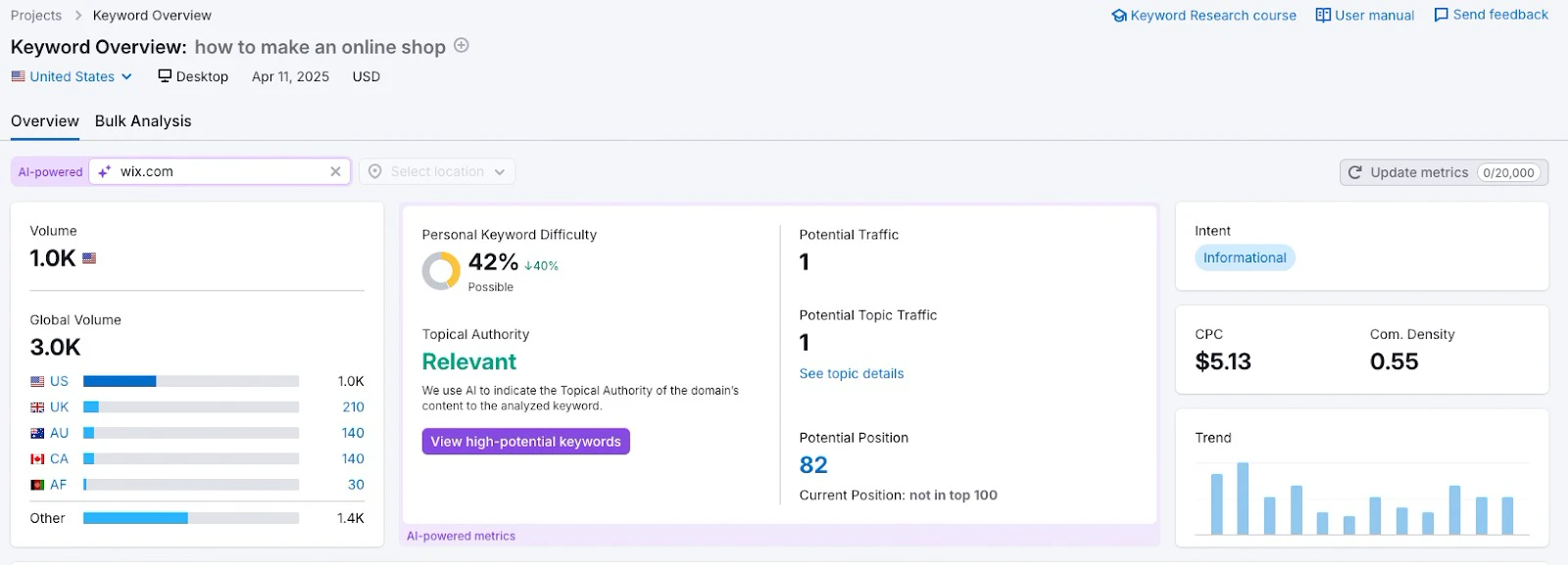
The visible report fields illustrate where to confirm the query context and inspect intent and metrics. Screenshot source Review keyword ideas for context
Look at the Keyword ideas widget for related keyword variations, questions, and keyword strategy clusters when they are available. Variations add modifying words, questions include question-form searches, and clusters group keywords a page may rank for.
The evidence says keyword clusters are available for a country-level report. Use these ideas to understand nearby queries, but keep the original keyword as the subject of the current SERP review.
Find the organic SERP analysis
Scroll to the organic results or SERP Analysis area. Review the domains and landing pages that appear, plus any SERP features listed. The screenshot shows a SERP Analysis table with ranking pages, domains, and feature markers. It is useful for seeing the type of evidence to inspect.
Compare the pages’ apparent purpose and format with your own proposed page. For example, note whether the visible results are store guides, product pages, forums, or another page type, but base that observation on what the report actually shows.
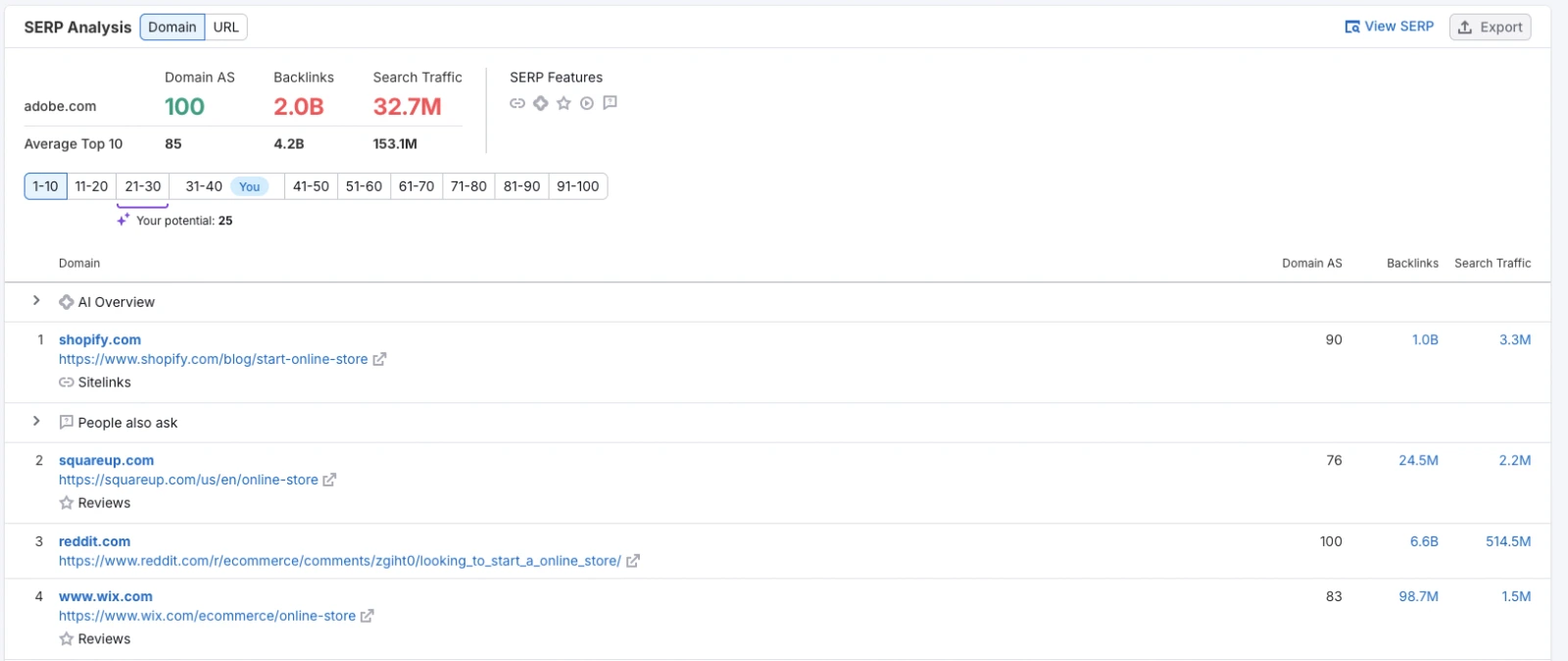
The table shows the organic result pages and features to review for search intent and page fit. Screenshot source Open the SERP and assess fit
Use View SERP when you want to view the search results for the keyword. Assess whether the ranking pages satisfy the same intent you want to target and whether your proposed content can serve that need.
The report may also provide Update metrics for real-time metrics on top-performing websites, according to the evidence. Use that action only if refreshed competitor metrics would help the review. Do not infer that the displayed “potential” fields promise a position or traffic outcome.
How does this Semrush setup work in practice?
Worked example: evaluating search intent for an online storefront query
An ecommerce consultant is evaluating whether a beginner storefront query represents transactional or informational search intent before drafting an extensive step-by-step setup tutorial.
| Choice | Why it matters | How to check |
|---|---|---|
| Run Keyword Overview for the exact query in the relevant country. | The report context determines which country-level data and SERP are being reviewed. | Verify the query and location shown at the top of the report. |
| Record the reported intent and distinguish it from CPC and Competitive Density. | Intent describes search purpose. The latter metrics relate to advertising competition and cost context. | Confirm each note corresponds to its own field, rather than treating one metric as a substitute for another. |
| Inspect the organic SERP pages and feature markers. | The ranking pages reveal what kinds of results currently appear for the query. | Summarize visible page types based on the actual report and open View SERP to inspect further. |
| Compare the observed result purpose with the planned guide. | A page concept should satisfy the need suggested by both the intent field and ranking results. | Choose to proceed, revise the format, or research another query based on the fit, not on a sample metric. |
Inspect the live SERP breakdown to confirm whether current top-ranking pages feature comprehensive guides or commercial software sales pages.
How do you verify your result in Semrush?
You have a report-based view of the keyword’s stated intent, related ideas, and organic result pages. Combine those observations to decide whether the query fits your content or search campaign and what page format deserves further research. Search volume is not the same as likely traffic, and the report’s potential metrics are estimates rather than guaranteed outcomes.
| Step | What you should see |
|---|---|
| Run the report for the target keyword | The report is showing the intended query and the appropriate country or location context. |
| Read the intent and headline metrics | You can record the reported intent and distinguish it from the other metrics shown in the report. |
| Review keyword ideas for context | You have noted whether related ideas help clarify the query without conflating them with the original keyword. |
| Find the organic SERP analysis | You have identified the visible result pages and any SERP features relevant to the query. |
| Open the SERP and assess fit | You can describe the kinds of pages currently competing and make a reasoned decision about whether your page concept fits the observed intent. |
Related Semrush guides include How to add competitors in Semrush Position Tracking and How to build a Semrush My Reports report from a template.
Which official Semrush sources were checked?
Every step and limit in this Semrush guide was verified against official documentation on 21 Nov 2026 following how we check figures, alongside more walkthroughs in our Semrush tutorials hub:
How do you troubleshoot common Semrush issues?
The intent label does not seem to match the pages I see. What should I do?
Treat the label and the visible SERP as separate evidence to compare. Recheck the keyword and location context, then inspect the result pages and features. If the results satisfy a different need than your proposed page, reconsider the target or page format.
Why do the metrics differ from another view?
The report can show national, global, or local information, and local metrics use a selected location. Confirm the country or location, date context, and whether you are comparing the same metric before drawing a conclusion.
Does a strong potential metric mean my page will rank?
No. The source describes potential traffic and potential position as AI-powered estimates or planning metrics. Use the competing pages and your own content fit to guide research, not as a promise of a particular ranking or traffic result.
 Reviewed byDanny Kirk
Founder of ReddiReach.
 Checked byAndrés Felipe
Digital designer and marketer.
Every figure is checked against the vendor's own page. Read our editorial standards.