
Key Takeaways
- In Shopify admin, edit the page title and meta description within the Search engine listing section to control organic search presentation.
- Ensure you have staff permissions to edit Shopify catalog products along with finalized copy for the title tag and meta description.
- Execute the five steps by accessing the product record, opening search settings, updating both fields, and saving your configuration changes.
- Verify the update by reopening the search engine listing panel in Shopify to confirm the saved title, description, and handle match.
Shopify enables merchants to customize the search engine page title and meta description for any catalog item directly within product details. Updating these snippet fields refines organic search presentation while preserving the existing product URL handle.
For plan limits and team seat pricing behind this workflow, read our Shopify review or connect Shopify to AI agents in Shopify API and MCP.
Key steps
What do you need before starting in Shopify?
Shopify requires the following workspace setup before you begin:
- You can access the Shopify admin and edit the product.
- Have the product’s intended page title and meta description ready.
How do you complete the steps in Shopify?
Follow these 5 steps in Shopify in order:
Open the product
In Shopify admin, go to Products and click the product whose search result text you want to update. For example, open your merino hiking socks product in the product list.
Open the search listing editor
Scroll to the Search engine listing section and click its pencil icon. This opens the editable fields for the page title, meta description, and URL handle.
Enter the page title
In Page title, enter a descriptive title that clearly identifies the product. Shopify notes that titles longer than 70 characters might be cut off in search results, so keep the key product phrase near the beginning.
Put the product type and distinguishing detail near the start of the Page title so the item remains identifiable if the text is shortened. Keep it accurate to the product page and avoid repeating the same phrase to fill space. Shopify’s 70-character guidance is a cutoff warning, not a promise that a search engine will display the full title.
Write the meta description
In Meta description, summarize what makes the item useful and include a relevant search phrase naturally. For example, describe the warmth, material, and intended use of merino hiking socks instead of repeating a list of keywords. Shopify indicates descriptions longer than 320 characters might be cut off.
Write the Meta description for a person deciding whether the result matches their need. Include a relevant phrase naturally, then use the remaining space for a concrete differentiator such as material or intended use. Compare the description with the product details so it does not promise a feature, size, or benefit the listing does not support.
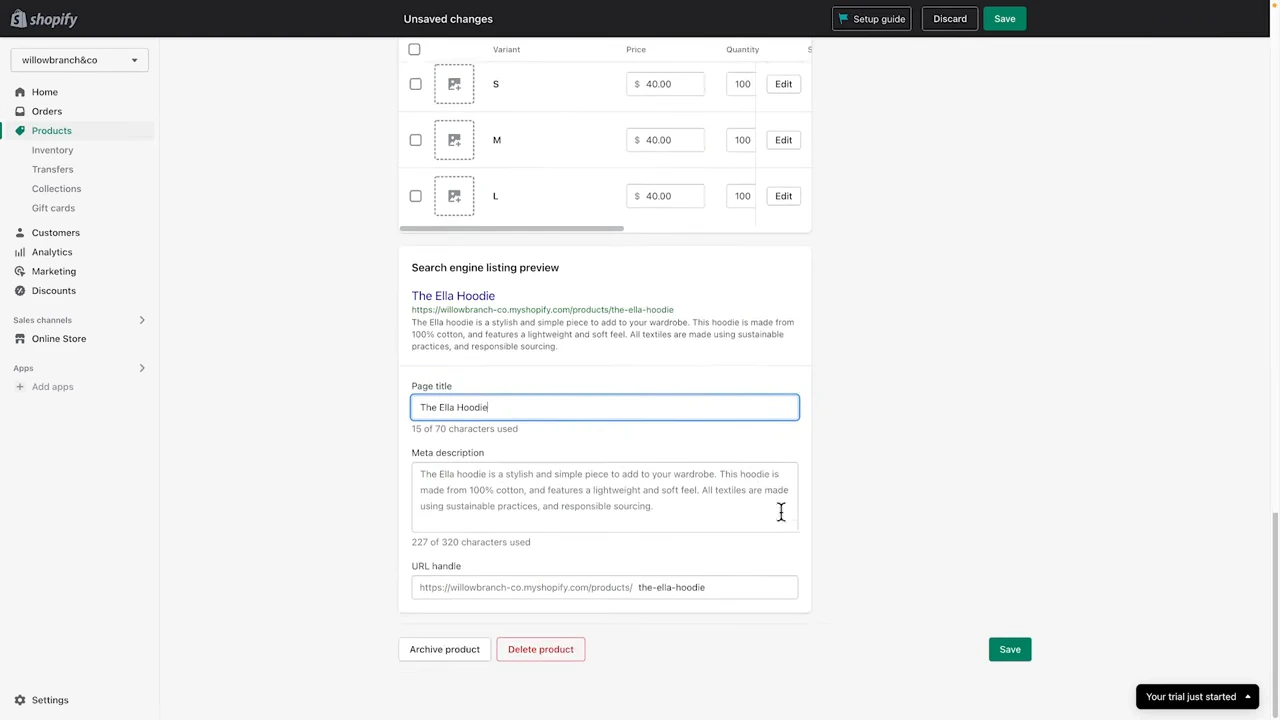
The product's search engine listing editor includes the page title, meta description, and URL handle. Screenshot source Review the preview and save
Check the search listing preview, which includes the product title, URL, and part of the product description. Keep the existing URL handle when the address should stay the same. Frequent URL changes can affect search visibility. Click Save.
Keep the existing URL handle when the product address should remain stable. If there is a specific reason to change it, consider the effect on existing links and search visibility, and follow Shopify’s URL redirect guidance for the changed address. After saving, confirm the title and description in the editor. The preview is an example of how the listing might appear.
How does this Shopify setup work in practice?
Worked example: updating search listing metadata for a merino hiking sock
An e-commerce team needs to update the search listing for an established merino wool hiking sock product page to highlight cool-weather walking benefits without modifying the live URL handle.
| Choice | Why it matters | How to check |
|---|---|---|
| Start the Page title with “Merino hiking socks” | The product and intended use are immediately clear. | Confirm the title matches the product page and remains within Shopify’s stated cutoff guidance if possible. |
| Mention warmth and material only as described on the page | A search summary should not promise a feature the listing does not substantiate. | Compare every product claim in the Meta description with the visible product details. |
| Keep the Meta description concise and readable | Shopify warns that text above 320 characters might be cut off, and search engines can display different text. | Review the saved field and preview for accuracy and truncation risk. |
| Leave the existing URL handle unchanged | The task is to improve snippet copy, not alter the product address. | Reopen Search engine listing and verify the URL handle is unchanged. |
Reopen the search listing card in Shopify to confirm the updated text and unchanged handle persist correctly before monitoring external search engine indexes.
How do you verify your result in Shopify?
Return to the product page and open Search engine listing again to confirm the saved title and description. Use the updated snippet as the search-facing summary for the product. Search engines may display different text in their results.
| Step | What you should see |
|---|---|
| Open the product | The product details page is open for the intended product. |
| Open the search listing editor | The Page title, Meta description, and URL handle fields are visible. |
| Enter the page title | The Page title field contains the intended title. |
| Write the meta description | The Meta description field contains the product summary you want shown. |
| Review the preview and save | The product page returns to its saved state, and reopening the Search engine listing editor shows your updated text. |
Related Shopify guides include How to add or rearrange menus in Shopify and How to add product variants in Shopify.
Which official Shopify sources were checked?
Every step and limit in this Shopify guide was verified against official documentation on 21 Nov 2026 following how we check figures, alongside more walkthroughs in our Shopify tutorials hub:
How do you troubleshoot common Shopify issues?
Why is my title or description cut off in search results?
Shopify says a page title over 70 characters or a meta description over 320 characters might be cut off. Shorten the text and keep the important product details near the start.
Why does the live search result not match the text I saved?
The preview shows how the listing might appear, but search engines can choose different text for a result. Check the fields in Shopify first to confirm the saved copy, then allow search engines to update their displayed result.
What should I check if the saved metadata is correct but the live result still shows old wording?
Search engines can retain an older crawl or choose different text from the page. Confirm the saved fields first, then inspect the page source for its title and meta description. If those are correct, use the relevant search engine’s recrawl or indexing process and allow time for it to revisit the page.
 Reviewed byDanny Kirk
Founder of ReddiReach.
 Checked byAndrés Felipe
Digital designer and marketer.
Every figure is checked against the vendor's own page. Read our editorial standards.