
Key Takeaways
- Ahrefs Competitive Analysis uncovers organic keywords where competitor domains rank in search results while your target domain or Exact URL currently has no ranking coverage.
- You need an active Ahrefs account with Competitive Analysis access, your target domain or page URL, and between one and 10 relevant competitor domains.
- Matching domain-level scope against full domains or Exact URL scope against specific pages prevents skewed comparisons and keeps keyword gap leads actionable for editorial planning.
- Verify completion in the Compare Gap report by checking filtered keyword rows, hovering over competitor position numbers to preview URLs, and inspecting ranking pages.
Find content gaps between domains in Ahrefs by opening Competitive Analysis, selecting Content Gap with Keywords enabled, entering your target alongside up to 10 competitor domains, and generating the Compare Gap report. Filter the resulting keyword list by location, KD, traffic, or competitor positions to isolate relevant organic topics your site does not currently rank for.
For plan limits and team seat pricing behind this workflow, read our Ahrefs review or connect Ahrefs to AI agents in Ahrefs API and MCP.
Key steps
What do you need before starting in Ahrefs?
Ahrefs requires the following workspace setup before you begin:
- An active Ahrefs account with access to Competitive Analysis.
- Your own domain or specific landing page URL to use as the comparison target.
- At least one and up to 10 competitor domains or URLs that serve a similar audience and topic area.
How do you complete the steps in Ahrefs?
Follow these 5 steps in Ahrefs in order:
Open Content Gap
From the Ahrefs top navigation bar, open Competitive Analysis and select Content Gap. Confirm that the Keywords option is selected before filling out the comparison fields. This workflow identifies organic search queries that competing sites rank for while your specified target does not.
Starting in the Keywords view ensures you evaluate missing search queries rather than link intersections. Keep your editorial goal in mind before entering targets so you know whether you are auditing overall site coverage or a single page.
Enter your domain
In the target input field, enter your root domain or a specific page address, then set the matching scope. Choose a domain-level scope when you want to evaluate site-wide organic coverage across all published content. Choose Exact URL when you only want to audit what a single landing page or article misses compared to competing pages.
Align your scope choice with the editorial decision in front of you. A domain-level comparison supports quarterly or site-wide content planning, whereas Exact URL works best when refreshing or scoping one targeted page. Avoid pairing a single Exact URL target against full competitor domains unless you intentionally want to measure one page against entire sites.
Add competitor domains
Enter at least one competitor domain into the competitor fields, adding up to 10 competitors in a single comparison. Prioritize sites that serve the same buyer profile, topic focus, or search intent rather than defaulting to broad industry publishers.
Even smaller niche sites make strong comparison inputs when their articles answer the exact questions your audience asks. Including massive multi-topic publishers often floods the report with unrelated queries that waste review time. Check the scope next to each competitor entry so domain-level audits compare domains and page-level audits compare individual URLs.
Generate the report
Select Show keyword opportunities to run the comparison. Ahrefs loads the Compare Gap report displaying the uncovered organic keywords alongside each competitor's ranking positions.
Scan the position columns to see which competitors hold strong visibility for each term. Hover your cursor over any ranking position number to preview the exact competitor URL capturing traffic for that query, or select the position number directly to open the live competitor page in a new tab and inspect how it structures the topic.
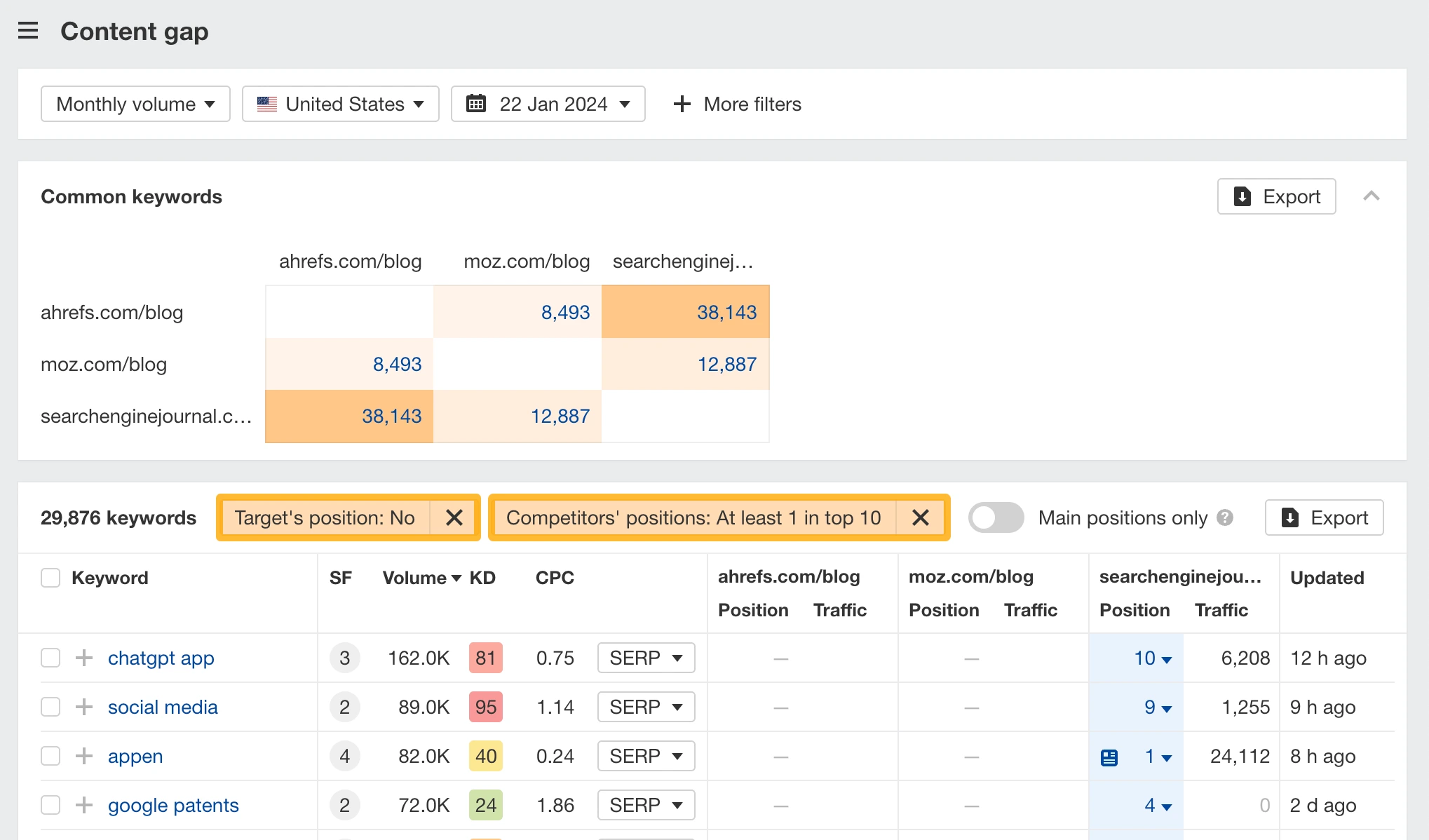
Use the competitor columns to see which sites rank for each opportunity. Screenshot source Narrow the opportunities
Use the report filter bar to narrow the keyword list by target location, time frame, KD, traffic, or ranking position ranges. When comparing multiple sites and looking for core category topics, open the Competitors positions dropdown and choose All competitors, where available, to surface queries every listed competitor ranks for.
Treat each surfaced keyword as a research lead rather than an automatic writing assignment. Verify that the underlying search intent fits your product or editorial scope, and check whether an existing page on your domain already addresses the topic under a close variant. Balance your position filters carefully: filtering out weak rankings removes noise, while setting overly strict ranges can hide emerging topics where competitors rank lower on page one or two.
How does this Ahrefs setup work in practice?
Example: evaluating workflow comparison topics for a project-management software team
A content strategist on a project-management software team wants to check whether the company blog and product site miss mid-funnel workflow comparison queries covered by direct category peers.
| Choice | Why it matters | How to check |
|---|---|---|
| Enter the software company's primary site at a domain-level scope | Checking full-site coverage prevents the team from briefing a duplicate article when an existing guide or feature page already ranks. | The target field displays the company domain with domain-level scope selected. |
| Add three direct project-management software competitors in the competitor fields | Focusing on peers with shared buyer needs keeps keyword results centered on workflow and software queries instead of broad business news. | All three competitor domains appear in the form with matching domain scopes. |
| Select Show keyword opportunities, filter to the primary target location, and set Competitors positions to All competitors | Requiring overlap across all entered competitors in the target market highlights core category queries first. | The Compare Gap report refreshes to show shared competitor keywords for the selected location. |
| Hover over position numbers and open the ranking competitor URLs for candidate comparison queries | Reviewing live pages reveals whether searchers expect a side-by-side feature breakdown, a template, or a beginner definition. | Each shortlisted keyword has been checked against live ranking pages for intent fit. |
The strategist approves a new comparison page only when the query matches buyer intent, no current URL on the domain covers the topic, and the team can publish a substantive answer; otherwise, the team updates a related existing guide or skips the term.
How do you verify your result in Ahrefs?
Confirm that the Compare Gap report lists filtered organic keywords alongside competitor ranking positions while excluding queries your target already captures. Hover over and open the ranking competitor pages for promising terms to verify search intent before deciding whether to brief a new page or expand an existing URL.
| Step | What you should see |
|---|---|
| Open Content Gap | The Content Gap input form is open on screen with the Keywords option selected. |
| Enter your domain | Your domain or page address appears in the target field with the intended scope applied. |
| Add competitor domains | Every intended competitor domain or URL is listed in the comparison form within the 10-competitor limit. |
| Generate the report | The Compare Gap report loads with a table of organic keywords and clickable competitor position data. |
| Narrow the opportunities | The Compare Gap report updates to show filtered keyword opportunities matching your location, difficulty, and competitor criteria. |
Related Ahrefs guides include Ahrefs Link Intersect guide and Find broken internal links in Ahrefs Site Audit.
Which official Ahrefs sources were checked?
Every step and limit in this Ahrefs guide was verified against official documentation on 21 Nov 2026 following how we check figures, alongside more walkthroughs in our Ahrefs tutorials hub:
How do you troubleshoot common Ahrefs issues?
Should I use a domain scope or Exact URL in Content Gap?
Use a domain-level scope when auditing overall site coverage to plan net-new articles across your domain. Choose Exact URL when comparing one specific landing page or guide against competing URLs to find subtopics your page misses.
Why does the Compare Gap report return very few keyword opportunities?
Verify that your target and competitor scopes match your intent, then inspect active report filters. Combining a strict All competitors requirement with narrow location, KD, traffic, or position ranges often filters out most candidate keywords.
Why do the surfaced gap keywords look unrelated to my planned topic?
Broad or multi-category competitors bring thousands of off-topic rankings into a domain-level comparison. Replace broad publishers with focused niche competitors, switch to Exact URL comparisons for topic-specific pages, and inspect competitor URLs via the position numbers to confirm intent.
 Reviewed byDanny Kirk
Founder of ReddiReach.
 Checked byAndrés Felipe
Digital designer and marketer.
Every figure is checked against the vendor's own page. Read our editorial standards.