
Key Takeaways
- Open AI Peekaboo Sources and select Domains to inspect external websites cited across tracked search answers.
- Access a brand workspace containing tracked artificial intelligence answers with exposed citations before applying topic or model filters.
- Navigate through five sequential steps to configure reporting filters, inspect domain citation counts, and export page-level details.
- Verify the Domains list displays populated citation tallies and model activity badges matching your selected filter criteria.
AI Peekaboo ranks domains cited across tracked artificial intelligence answers to reveal which models cite specific external publications. Filter the Domains view by date range, model, and topic to isolate high-frequency citation sources.
For plan limits and team seat pricing behind this workflow, read our AI Peekaboo review or connect AI Peekaboo to AI agents in AI Peekaboo API and MCP.
Key steps
What do you need before starting in AI Peekaboo?
AI Peekaboo requires the following workspace setup before you begin:
- Open a brand workspace with tracked AI answers that expose citations.
- Know the model, topic, or date range you want to inspect, if you plan to narrow the results.
How do you complete the steps in AI Peekaboo?
Follow these 5 steps in AI Peekaboo in order:
Open Sources
Choose Sources in the dashboard navigation. This page collects citation information from tracked answers. A citation indicates that an AI answer used or returned a source. It is distinct from whether the answer mentioned your brand by name.
Choose the Domains view
Select Domains. The ranked list shows domains cited most often, with Site Type and Owner labels and a model heatmap. Start here to find which websites appear across your tracked answers. Choose URLs instead when you need specific cited pages.
Use Domains when the question is about which websites recur. Use URLs when you need the individual pages behind a domain. A domain's rank is based on citation counts, so treat it as evidence of observed citations in the selected data, not as a measure of site quality or authority.
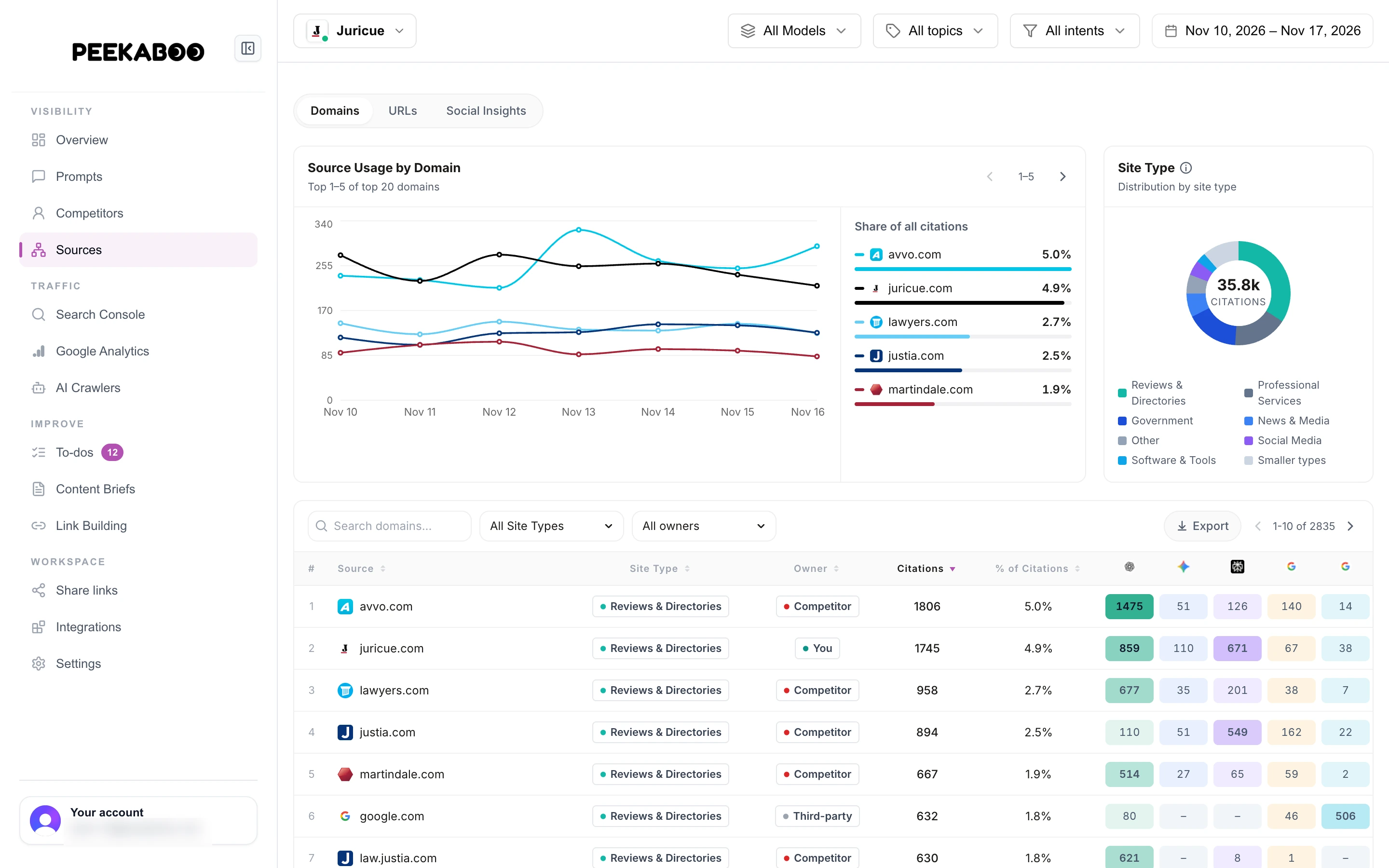
The Domains tab shows a citation trend chart and a table of cited domains. Screenshot source Narrow the results with filters
Use the available time range, model, topic, or site type filters to focus the results. For example, select one AI model to see which domains that model cites most often, or narrow to a topic to inspect a particular product category. Search can help locate a domain you already have in mind.
Change one filter at a time when investigating a missing domain. First widen the time range, then compare the model or topic. This makes it easier to see which selection removes the row. Keep the scope written down if you export results for someone else.
Interpret the ranking
Read the citation count and share shown for each domain in the selected window. The ranking measures how often each domain is cited. Use the model heatmap to compare which engines cite each domain.
Compare the model heatmap within the same filtered view. A domain that appears often overall may be concentrated in one model, so avoid describing it as a cross-model pattern unless the heatmap supports that conclusion.
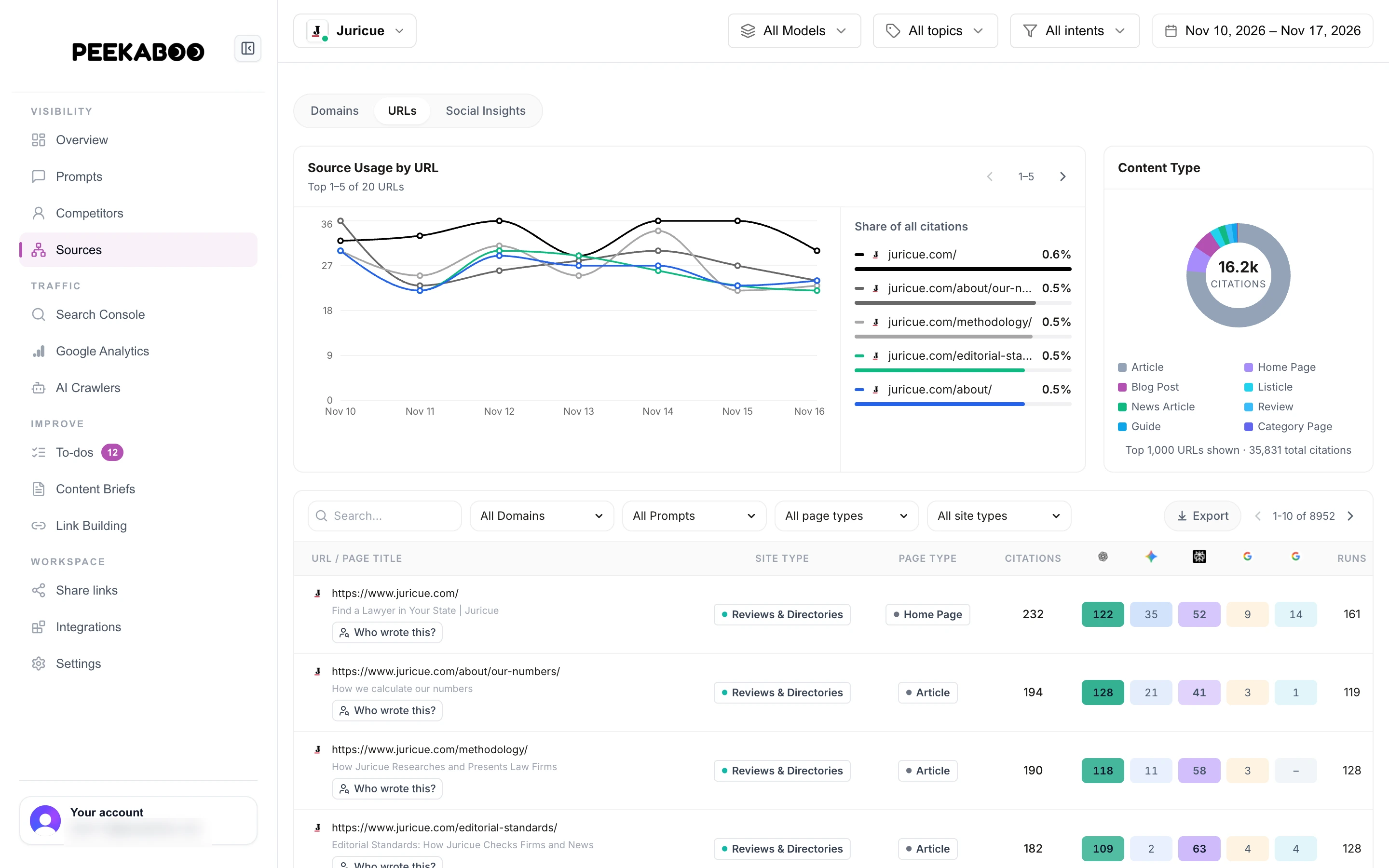
The ranking table gives you each domain's citations and a breakdown by model. Screenshot source Export or inspect pages
If you need to share or analyze the results elsewhere, choose Export on the Domains view to download CSV. To find the exact pages behind a domain, switch to URLs and review its cited pages, page type, citation counts, and last-seen details where available.
Before acting on a domain, switch to URLs and inspect cited pages. One domain can host different kinds of pages, and the specific URLs provide a more useful basis for deciding whether to research content, reviews, or outreach.
How does this AI Peekaboo setup work in practice?
Choose a research lead from model-specific citations
A content lead decides whether to study a review publication or a comparison portal for an upcoming product brief using domain citation metrics.
| Choice | Why it matters | How to check |
|---|---|---|
| Set the time range to the reporting period | A bounded window keeps the comparison tied to the campaign being planned. | The selected time range remains visible while reviewing the domain rows. |
| Filter to the target topic | Category-specific citations are more relevant than citations from unrelated tracked questions. | The Domains table reflects the topic filter. |
| Select the model used by the target audience | Model-specific patterns can reveal whether a domain's citations are concentrated in one engine. | The model heatmap and citation counts reflect that model. |
| Compare the leading review and comparison domains | Their citation counts show observed frequency, while Site Type and Owner provide context for the kind of source. | Record each domain's displayed count and its model activity without interpreting either as authority. |
| Switch to URLs for the candidate domain | The lead needs page-level evidence before deciding what to study or pursue. | Review the cited URLs, page types, counts, and last-seen details where shown. |
Choose a research lead only after checking the actual URLs and their relevance to the prompt set. A high count identifies repeated citation in this view without establishing editorial quality, accessibility, or outreach suitability.
How do you verify your result in AI Peekaboo?
Confirm the Domains list contains cited websites and counts for the selected scope. Use the most relevant domains to guide further content research or outreach, then inspect URLs before acting on an individual page.
| Step | What you should see |
|---|---|
| Open Sources | The Sources page opens with its domain and page citation views. |
| Choose the Domains view | The Domains view displays domain rows and citation information by model. |
| Narrow the results with filters | The table reflects the selected filters or search term. |
| Interpret the ranking | Each displayed domain has citation totals or model counts corresponding to the active date range and filters. |
| Export or inspect pages | The CSV export is available from Domains, or the URLs view shows specific cited pages. |
Related AI Peekaboo guides include Build a prompt list in AI Peekaboo and Customize the AI Peekaboo Overview.
Which official AI Peekaboo sources were checked?
Every step and limit in this AI Peekaboo guide was verified against official documentation on 21 Nov 2026 following how we check figures, alongside more walkthroughs in our AI Peekaboo tutorials hub:
How do you troubleshoot common AI Peekaboo issues?
Why is a domain missing from the list?
The selected date range, model, topic, or site type may exclude its citations. Check the filters and try a broader range. The page only shows sources captured from tracked answers.
Does a high citation count mean the domain has high authority?
No. The ranking counts citations and is not weighted by domain authority or another trust score.
Why does a domain appear in the overall list but disappear when I choose one model?
Its citations may be associated with other models in the selected window. Check the heatmap, clear the model filter, and compare the same date range and topic before concluding the domain was never cited.
 Reviewed byDanny Kirk
Founder of ReddiReach.
 Checked byAndrés Felipe
Digital designer and marketer.
Every figure is checked against the vendor's own page. Read our editorial standards.