
Key Takeaways
- Inspect outbound destinations in Ahrefs Site Explorer using the Outgoing links report to identify redirects and broken URLs.
- Maintain an active Ahrefs subscription with Site Explorer access and prepare the exact target URL or directory to audit.
- Work through six audit steps in Ahrefs Site Explorer to scope targets, filter link types, and isolate destination anomalies.
- Confirm candidate links in Ahrefs Site Explorer by comparing reported redirect codes against actual destination behavior on the source page.
Audit external outgoing links in Ahrefs Site Explorer to locate broken destinations, unexpected redirects, and legacy affiliate URLs across individual pages. Reviewing destination targets and HTTP response codes helps protect referral paths and domain authority.
For plan limits and team seat pricing behind this workflow, read our Ahrefs review or connect Ahrefs to AI agents in Ahrefs API and MCP.
Key steps
What do you need before starting in Ahrefs?
Ahrefs requires the following workspace setup before you begin:
- An Ahrefs account with access to Site Explorer.
- The exact website, subsection, or page URL you want to inspect.
- A clear review purpose, such as finding redirect links, unexpected domains, image links, or affiliate-style URLs.
How do you complete the steps in Ahrefs?
Follow these 6 steps in Ahrefs in order:
Set the target scope
Open Site Explorer and enter the exact website, subsection, or URL you want to inspect. Use a page URL when the audit is limited to one page. Use a broader target when you intend to review links across a larger part of the site.
Select the scope mode that matches your target and open the report navigation.
Open the Outgoing links report
Choose Outgoing links in the Site Explorer reports. The report lists links from the selected target to other websites. Review the visible destination and referring page information before filtering so you understand the current result set.
Choose one audit question
Decide what you are trying to identify before applying filters. For example, you might be checking whether a specific destination appears, whether a link goes through a redirect, or whether the destination is an image or another non-HTML resource.
Keep each pass focused. A filter or search only helps when it maps to a question you can verify against your own pages.
Narrow the report to that pattern
For redirect investigation, filter Link type to Redirect. The screenshot shows this filter active and rows marked as 301 redirects, so use it as a visual reference for identifying redirect entries. For image or file patterns, search for the relevant extension in the Target URL. For a known affiliate URL structure, search that structure. A broad question-mark search can surface candidate URLs, but it does not by itself prove an affiliate relationship.
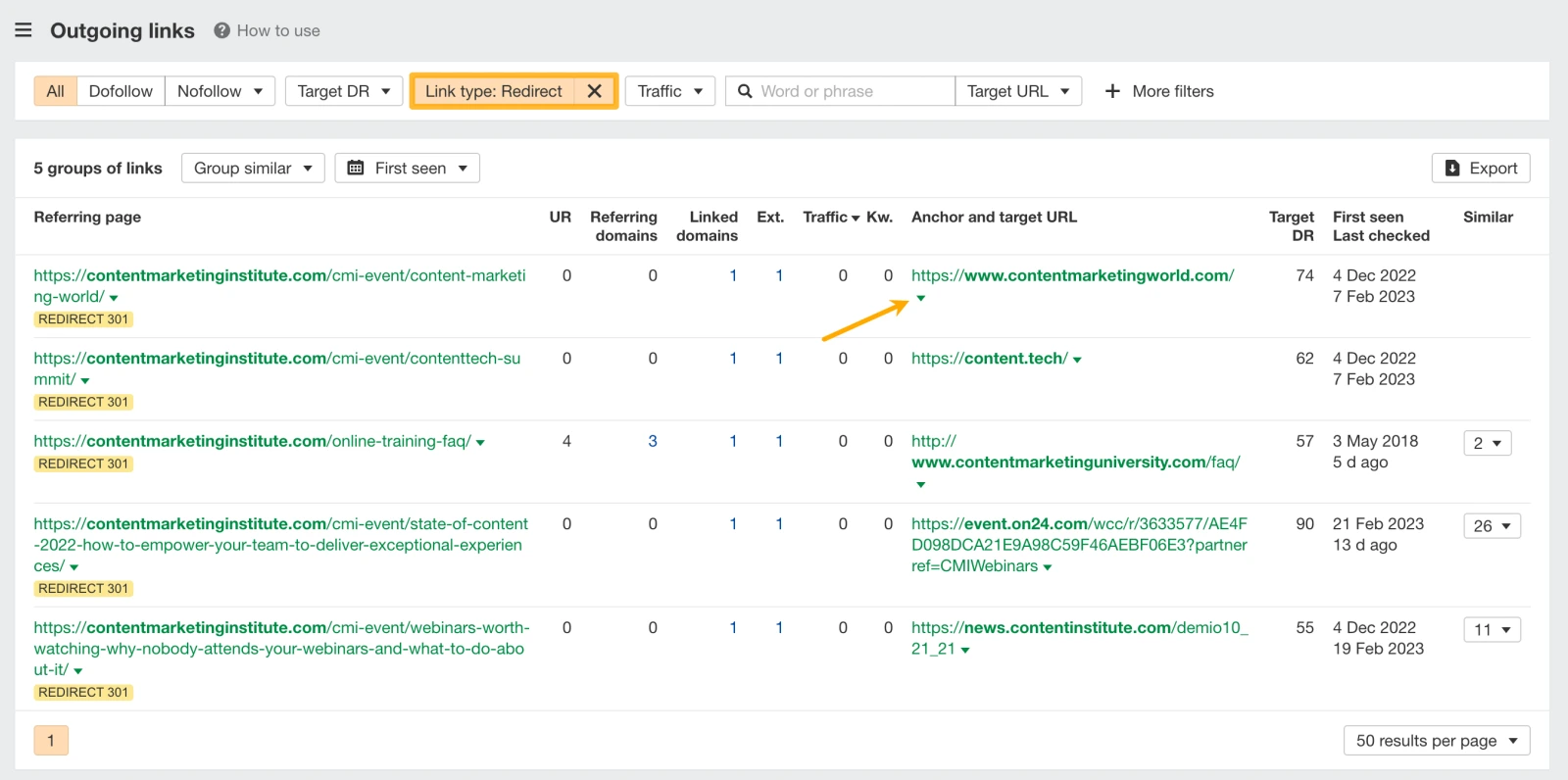
The visible report is a redirect-filtered example. Use the Link type filter to narrow the outgoing-link review. Screenshot source Inspect destinations and referring pages
Read the destination alongside the referring page. Check whether the destination is relevant and expected, whether the referring page is one you control, and whether the link appears intentional. Sorting by First seen or Linked pages can help prioritize destinations or pages for inspection.
A redirect entry is evidence of a link path reported by the tool. Open the source page and verify the current link before deciding whether to update it.
Resolve findings on the source page
For links that look unwanted or outdated, inspect the page in your own publishing system and confirm the link's purpose with the page owner or editor. Update or remove it only after that review. If comparing destinations across sites, use Linked pages as a count to guide investigation, not as a quality or performance judgment by itself.
How does this Ahrefs setup work in practice?
Worked example: auditing redirect candidates across event pages
A web editor audits an event directory to verify that external references continue routing visitors to current venue sites rather than redirect chains or parked domains.
| Choice | Why it matters | How to check |
|---|---|---|
| Set Site Explorer to the event page or relevant site scope. | The audit should cover only the pages being reviewed. | The displayed target matches the chosen scope. |
| Open Outgoing links and filter Link type to Redirect. | This focuses the review on redirect candidates, as shown in the screenshot. | Visible rows carry redirect labels and show referring-page and destination details. |
| Record each candidate source page and destination for editorial review. | A redirect may be intentional or may reflect a changed destination. The row alone does not decide that. | Each candidate can be matched to a page the team can inspect. |
| Verify the live link and decide whether to update it. | The final decision depends on current page context and the intended destination. | Any change has a confirmed source and a documented reason. |
When an external link routes through an obsolete redirect chain, the editor coordinates with the page author to update the anchor destination directly in the content management system.
How do you verify your result in Ahrefs?
You have a scoped inventory of external links and a verified set of items to investigate or correct. Interpret the report as a discovery aid: a redirect marker, file extension, or unusual destination identifies a candidate, while the page context determines whether action is appropriate.
| Step | What you should see |
|---|---|
| Set the target scope | The target shown in Site Explorer matches the intended page or site scope. |
| Open the Outgoing links report | The report heading is Outgoing links and rows show external destinations associated with your target. |
| Choose one audit question | You can state the specific link pattern or destination you are investigating. |
| Narrow the report to that pattern | The remaining rows match the selected investigation pattern, or you have noted that a broad search returns candidates requiring review. |
| Inspect destinations and referring pages | Each candidate has a referring page and destination recorded for follow-up, with uncertain cases marked for manual verification. |
| Resolve findings on the source page | Every proposed change is tied to a confirmed source-page link and has an owner or reason for the change. |
Related Ahrefs guides include Ahrefs Link Intersect guide and Find broken internal links in Ahrefs Site Audit.
Which official Ahrefs sources were checked?
Every step and limit in this Ahrefs guide was verified against official documentation on 21 Nov 2026 following how we check figures, alongside more walkthroughs in our Ahrefs tutorials hub:
How do you troubleshoot common Ahrefs issues?
Why do I see redirect rows?
The report is filtered to Link type: Redirect, which can surface link paths identified as redirects. Check the referring page and destination directly to determine whether the link still needs attention.
Does a question mark in the Target URL prove a link is an affiliate link?
No. It can help find candidate URLs when a known structure is unavailable, but query parameters have other uses. Verify the destination and the site's relationship before classifying it.
Why does a destination count differ from my manual page review?
The report target may cover a broader or different scope than the pages you checked, and the report may include links you have not reviewed yet. Confirm the target scope, then compare individual referring pages.
 Reviewed byDanny Kirk
Founder of ReddiReach.
 Checked byAndrés Felipe
Digital designer and marketer.
Every figure is checked against the vendor's own page. Read our editorial standards.