
Key Takeaways
- Build dynamic subsets of your Brevo database by combining contact attributes, email opens, and website order or cart events with AND and OR operators.
- Ensure contact attributes and email or website interaction events are already tracked in your Brevo database before setting conditions.
- Five steps cover selecting a custom filter or segment template, defining a single rule, layering AND conditions, grouping OR behaviors, and activating the segment.
- Confirm your setup works as matching contacts automatically enter the segment and update in real time when behavior changes.
Dynamic segments in Brevo group contacts automatically using attribute and event conditions that update in real time as records change. Marketing teams build single-rule and multi-rule segments to target offers, run automations, and clean unengaged contacts from their lists.
For plan limits and team seat pricing behind this workflow, read our Brevo review or connect Brevo to AI agents in Brevo API and MCP.
Key steps
What do you need before starting in Brevo?
Brevo requires the following workspace setup before you begin:
- A Brevo account with contacts imported into your database or contact lists
- Tracked contact attributes (like location or signup date) or events (email opens, orders, or cart adds)
- Defined campaign or cleanup goals so you know whether rules need AND or OR logic
How do you complete the steps in Brevo?
Follow these 5 steps in Brevo in order:
Choose between a custom segment filter or a segment template
Start by choosing either to Create a segment from scratch to filter contacts with custom rules or to Segment your contacts using a segment template. Decide whether the segment should evaluate your full database or narrow a specific contact list.
Unlike static lists, Brevo segments update automatically in real time: contacts enter as soon as they match your conditions and leave the moment they stop matching.
Define a single-condition attribute or event rule
Set a single baseline condition using an attribute or event, such as contacts in a specific contact list, contacts who opened an email campaign at least once in the last month, or contacts who placed a website order in the last 2 months.
Single-condition segments work well when sending focused offers, like messaging past-month buyers instead of your full list.
Layer strict multi-rule filters with the AND operator
Narrow membership by joining rules with AND so contacts must satisfy every condition simultaneously, such as contacts who received at least one email campaign between two dates AND did not open any during that period.
Multi-rule AND segments support both cross-selling (bought one product AND never bought related items) and isolating inactive subscribers.
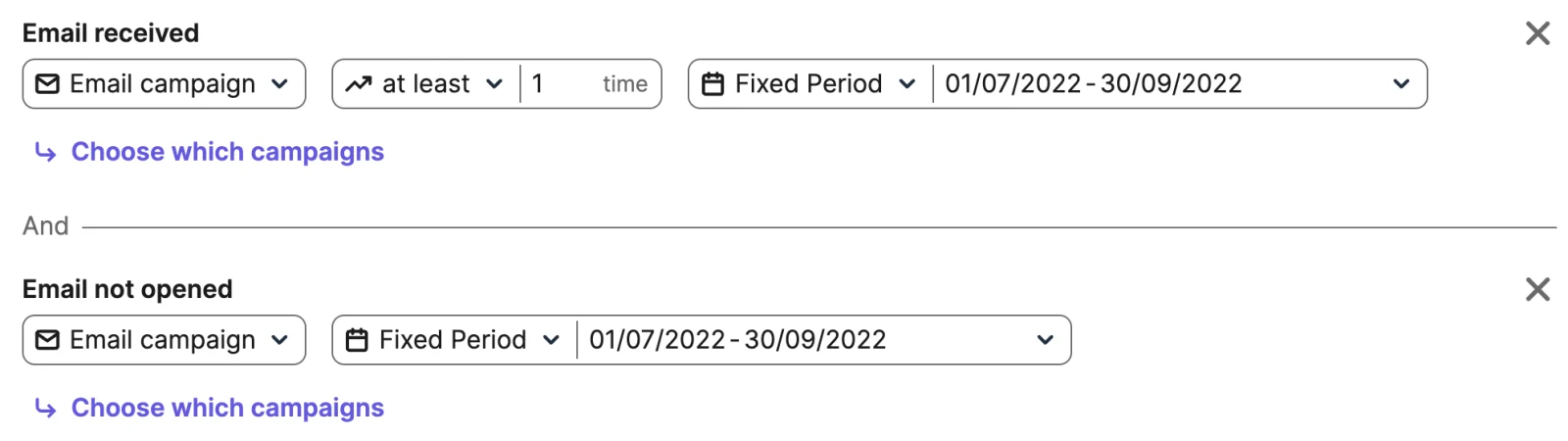
Verify the AND operator between your received email campaign date rule and non-opener condition. Screenshot source Combine alternative shopper behaviors with OR and AND logic
Broaden high-intent reach while preserving list boundaries by pairing OR and AND rules, such as contacts who placed a website order in the last 6 months OR added an article to their cart in the last month AND belong to a specific contact list.
Grouping OR shopping events with an AND list check targets both recent buyers and active cart browsers inside one opted-in list.
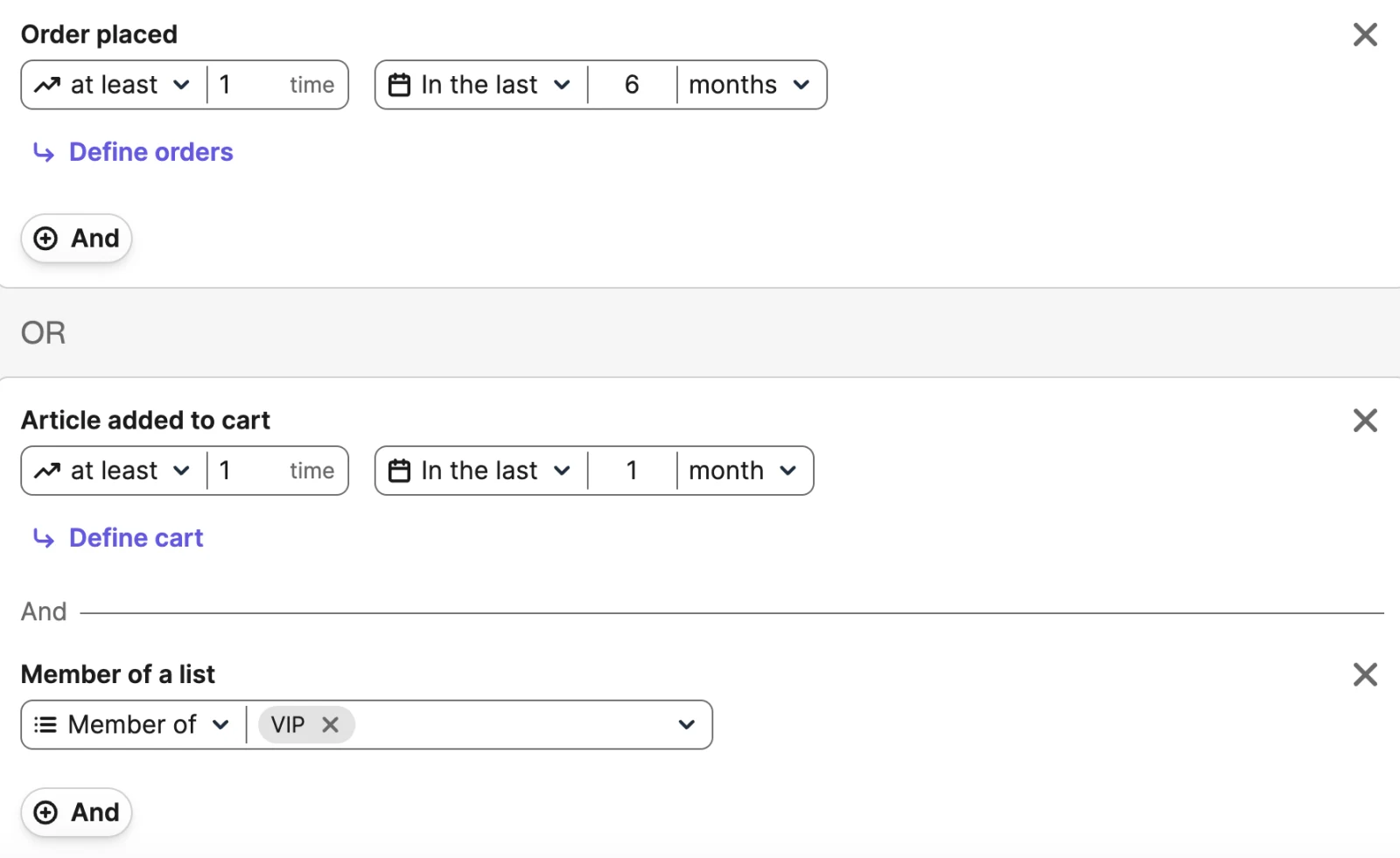
Check how OR groups recent orders and cart additions before narrowing membership with an AND list condition. Screenshot source Activate the segment in campaigns, automations, and list cleanup
Target your saved segment inside an email campaign or Automation to send coupons, cross-sell offers, or re-engagement messages. For old and unengaged contacts surfaced by your segment, send one final re-engagement email and blocklist contacts who remain unresponsive.
Real-time segments also let you analyze spending habits and message behavior directly, while blocklisting inactive contacts protects email deliverability.
How does this Brevo setup work in practice?
Worked example: Isolating active shoppers and unengaged subscribers
An online store builds two dynamic Brevo segments ahead of a seasonal promotion: one for active shoppers and one for database hygiene.
| Choice | Why it matters | How to check |
|---|---|---|
| Shopper segment: Order in 6 months OR cart add in 1 month AND newsletter list | Groups recent buyers and cart browsers within the opted-in newsletter list. | OR event rules and AND list filter display together. |
| Cleanup segment: Email received in 3-month window AND zero opens | Pinpoints subscribers who stopped opening campaigns over a quarter. | Received and non-open rules link via AND over matching dates. |
| Send final re-engagement email, then blocklist non-responders | Confirms disinterest before removing inactive contacts from future sends. | Unresponsive contacts are blocklisted and active shoppers get the promo. |
The store promotes seasonal bundles strictly to engaged shoppers and blocklists non-responders, lifting open rates on subsequent sends.
How do you verify your result in Brevo?
Verify the contacts matched by your segment rules reflect your expected attributes, timeframes, and AND or OR logic. Next, load the saved segment in CRM > Contacts for bulk edits or attach it to a Brevo email campaign or Automation.
| Step | What you should see |
|---|---|
| Choose between a custom segment filter or a segment template | Your segment builder opens ready for attribute or event rules. |
| Define a single-condition attribute or event rule | The condition row displays your chosen list, email open, or website order rule. |
| Layer strict multi-rule filters with the AND operator | Both condition rows appear linked by AND so only contacts meeting every rule match. |
| Combine alternative shopper behaviors with OR and AND logic | The builder groups your OR order and cart events cleanly with the AND contact list rule. |
| Activate the segment in campaigns, automations, and list cleanup | Your segment is available in campaigns and Automations and updates its contact count in real time. |
Related Brevo guides include How to create, design, and schedule an email campaign in Brevo and How to use saved segments for contacts and automations in Brevo.
Which official Brevo sources were checked?
Every step and limit in this Brevo guide was verified against official documentation on 27 Nov 2026 following how we check figures, alongside more walkthroughs in our Brevo tutorials hub:
How do you troubleshoot common Brevo issues?
Do Brevo segments require manual refreshing when contacts place new orders?
No, Brevo segments evaluate rules dynamically in real time. Contacts enter automatically when their attributes or events match your conditions and exit as soon as they stop matching.
When should I join segment rules with AND instead of OR in Brevo?
Use AND when contacts must meet every rule at once, like receiving emails AND never opening them. Use OR when either action qualifies them, like ordering in 6 months OR adding to cart in 1 month.
How do segments help clean my database without losing contact history?
Build an AND segment of older contacts who received campaigns over a set period without opening any, and send one re-engagement message. Blocklist contacts who still do not engage so future sends focus on active subscribers.
 Reviewed byDanny Kirk
Founder of ReddiReach.
 Checked byAndrés Felipe
Digital designer and marketer.
Every figure is checked against the vendor's own page. Read our editorial standards.