
Key Takeaways
- Construct multi-rule filter queries in Ahrefs Page Explorer to pinpoint specific technical website issues across recent crawl data.
- Ensure you have an active Ahrefs Site Audit crawl project with analyzed pages available before building advanced filter combinations.
- Execute six systematic steps to define conditions, establish rule groupings, assign logical operators, and evaluate crawl context parameters.
- Validate the applied filter results by comparing returned URLs against your intended logical criteria to prevent accidental rule mismatches.
Combine multiple technical and content rules using nested AND and OR logic in Ahrefs Page Explorer. Construct targeted filter groups to isolate complex crawl issues such as indexable pages missing critical metadata tags.
For plan limits and team seat pricing behind this workflow, read our Ahrefs review or connect Ahrefs to AI agents in Ahrefs API and MCP.
Key steps
What do you need before starting in Ahrefs?
Ahrefs requires the following workspace setup before you begin:
- Ahrefs Site Audit access and a project with crawl data available in Page Explorer.
- A specific page issue you want to find, expressed as conditions such as HTTP status, indexability, or meta description properties.
- A clear understanding of which conditions must all be true and where either of multiple alternatives is acceptable.
How do you complete the steps in Ahrefs?
Follow these 6 steps in Ahrefs in order:
Open Page Explorer and define the issue
Open Page Explorer for the relevant Site Audit project. Write down the page conditions you want to find before adding rules. The supplied example looks for valid 200 internal HTML pages that are indexable, then checks for a missing meta description or one that exists but is empty.
Add rules for the conditions
Add a rule for each condition the report needs to evaluate. In the screenshot, the visible rules include Is valid (200) internal HTML page, Is indexable page, Meta description, No. of meta descriptions, and Meta description length. Use the available rule choices in your own report. Do not assume a rule that is not visible or offered in your interface.
Group conditions that must be true together
Put conditions that must all hold into an AND group. In the example, the first group requires a valid 200 internal HTML page AND an indexable page. An AND group only matches when all the included rules or groups are true.
Represent alternatives with OR
Use an OR group when either of its contained conditions or groups can satisfy that part of the filter. In the example, the meta description does not exist OR a nested group is true. That nested AND group requires one meta description and a character length of zero, representing an existing but empty description.
Check crawl context and apply
Review the crawl selectors shown for the rules and groups. The screenshot includes Previous and Current options, so make sure the selected context matches the crawl you mean to inspect. Select Apply to run the filter, then read the matching pages against the logic you intended.
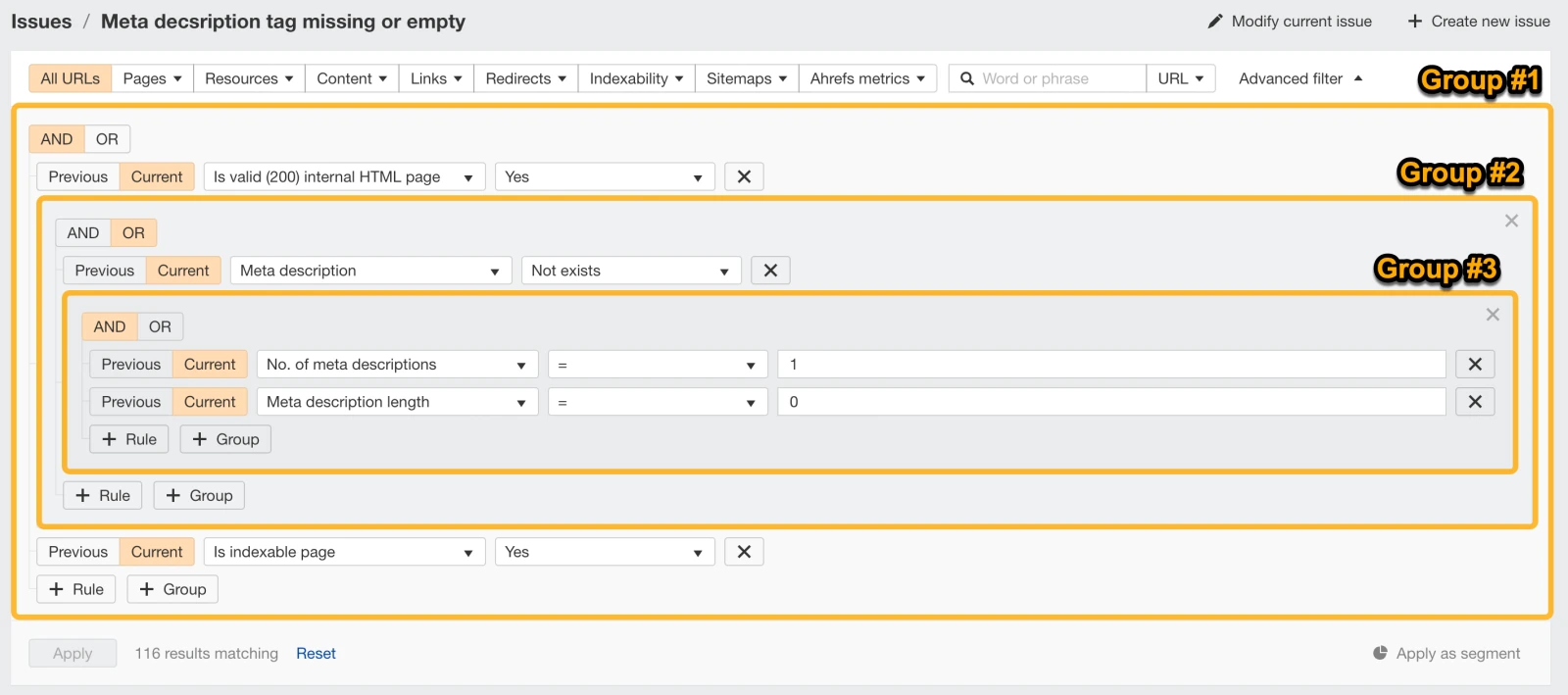
The screenshot shows nested groups and the visible crawl selectors, plus an applied result count for the displayed filter. Screenshot source Validate the logic against the result
Read the filter from the nested group outward: first confirm the empty-description branch, then the missing-or-empty alternative, then the base page requirements. If the results do not fit that sentence, revisit the group boundaries and operators before using the results. The example screenshot shows 116 matching results, which is specific to that shown filter and data.
How does this Ahrefs setup work in practice?
Find pages with missing or empty descriptions
A site owner needs a list of valid, indexable internal HTML pages whose meta description is either absent or empty.
| Choice | Why it matters | How to check |
|---|---|---|
| Add rules for valid 200 internal HTML pages and indexability. | These are the base requirements for pages in the hypothetical audit. | Both rules appear in the same AND group. |
| Add a branch for a meta description that does not exist. | This covers pages with no description value. | The rule is included as one side of an OR group. |
| Create a nested AND group for one description and length zero. | Together, those rules express an existing but empty description in the supplied example’s logic. | Both conditions are in the nested AND group. |
| Review crawl context and apply the filter. | The result should reflect the intended current or previous crawl selection. | A matching page can be explained by the base requirements and one of the two description branches. |
The owner receives a focused set of matching URLs to review and can decide whether to address missing and empty descriptions in the same remediation pass or split them into separate work items.
How do you verify your result in Ahrefs?
You have a repeatable filter whose logic can be described as a sentence and checked against the report. In the screenshot’s example, a match must be a valid 200 internal HTML page and indexable, and its meta description must either not exist or exist with a character length of zero. The displayed count belongs to that example and does not predict your own result count.
| Step | What you should see |
|---|---|
| Open Page Explorer and define the issue | You can state the target page conditions in plain language before building the filter. |
| Add rules for the conditions | Each condition in your written definition has a corresponding rule in the filter. |
| Group conditions that must be true together | The rules that must all match are together in an AND group. |
| Represent alternatives with OR | The OR branch includes the intended alternatives, and the nested group expresses the empty-description case. |
| Check crawl context and apply | The selected crawl context is intentional and the report displays results after applying the filter. |
| Validate the logic against the result | You can explain why a page should match or fail using the visible rules and groups. |
Related Ahrefs guides include Ahrefs Link Intersect guide and Find broken internal links in Ahrefs Site Audit.
Which official Ahrefs sources were checked?
Every step and limit in this Ahrefs guide was verified against official documentation on 21 Nov 2026 following how we check figures, alongside more walkthroughs in our Ahrefs tutorials hub:
How do you troubleshoot common Ahrefs issues?
Why are too many pages matching?
A group may use OR where the intended conditions must all be true, or a rule may sit outside the group you meant it to constrain. Review the filter from the inner groups outward and compare it with your plain-language definition.
Why are pages with a description appearing in the results?
The example intentionally includes an existing but empty description as one alternative. Check whether your filter includes the count and length rules, and whether the operator between that branch and the missing-description rule is OR as intended.
Why do the results differ between crawls?
The filter can use previous or current crawl context, as shown in the interface. Check the selected crawl for each applicable condition and make sure you are comparing the context you intend.
 Reviewed byDanny Kirk
Founder of ReddiReach.
 Checked byAndrés Felipe
Digital designer and marketer.
Every figure is checked against the vendor's own page. Read our editorial standards.