
Key Takeaways
- Switch between device views in Ahrefs Rank Tracker to inspect position gaps across mobile and desktop search engine indexes.
- Set up tracked keywords inside an active Ahrefs Rank Tracker project with device tracking enabled before analyzing ranking data.
- Follow five quick steps to open the project, view desktop rankings, toggle mobile tracking, and compare keyword performance metrics.
- Confirm ranking discrepancies by verifying whether search engine result page features differ significantly between mobile and desktop devices.
Toggle between device views in Ahrefs Rank Tracker to evaluate position differences across mobile and desktop search results. Spotting device-specific visibility gaps helps prioritize technical responsive layout fixes or mobile page experience optimizations.
For plan limits and team seat pricing behind this workflow, read our Ahrefs review or connect Ahrefs to AI agents in Ahrefs API and MCP.
Key steps
What do you need before starting in Ahrefs?
Ahrefs requires the following workspace setup before you begin:
- A project in Ahrefs Rank Tracker with keywords already added.
- A device comparison question, such as whether the tracked keywords show different positions on mobile and desktop.
How do you complete the steps in Ahrefs?
Follow these 5 steps in Ahrefs in order:
Open the tracked project
Go to Rank Tracker and select the project you want to examine. The project needs tracked keywords before its rankings can be reviewed.
The screenshot shows an Overview report for a project, with report tabs and device controls visible. It is an example of the relevant interface, not evidence about your project's own results.
Review the Desktop view
In the report, select `Desktop` and note the keywords and measures you want to compare. Keep the comparison focused on the same project and report when you switch devices.
Record the visible date or comparison period too, if one is displayed, so you can interpret the two views in context.
Switch to Mobile
Choose `Mobile` in the device controls. The report updates to show mobile ranking data for the keywords currently tracked.
The screenshot provided displays both Desktop and Mobile controls, with Mobile selected. It also shows summary measures such as Share of Voice, average position, and traffic, along with a date comparison. The image is a specific report view, not a promise that every project or report presents identical figures.
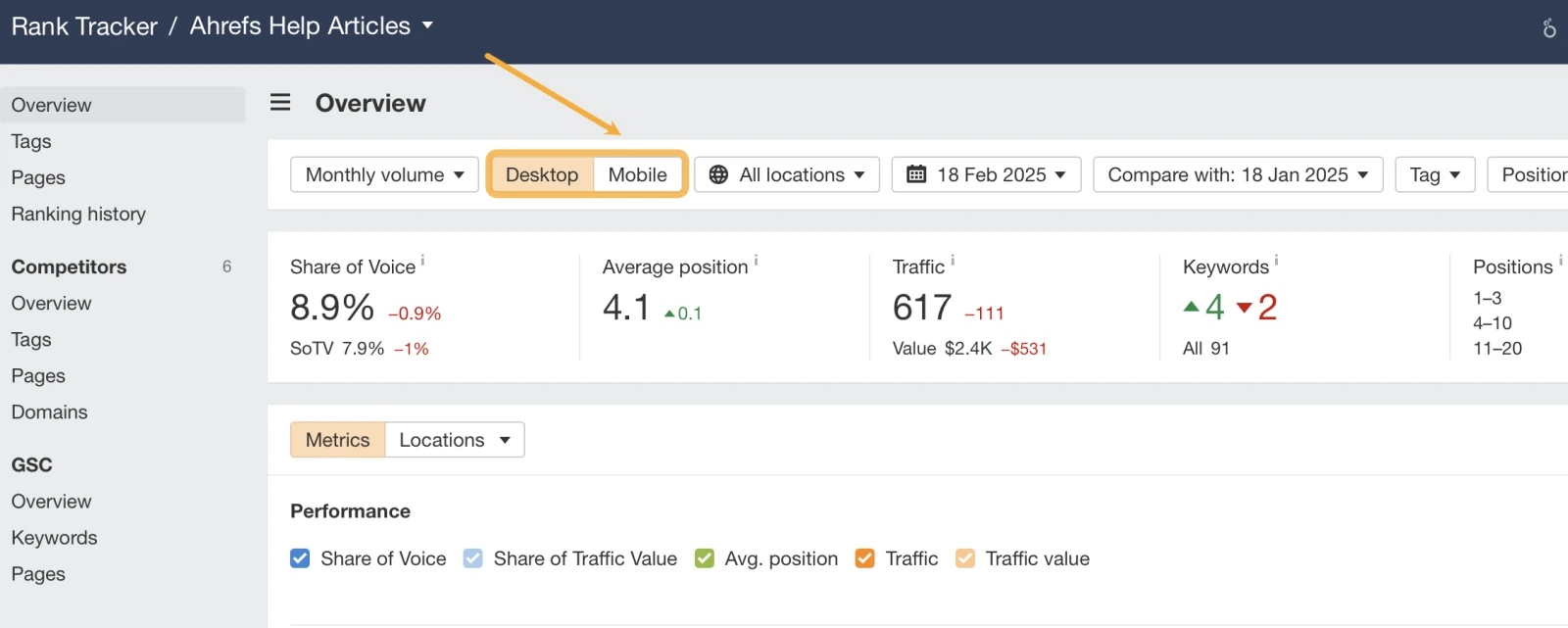
This report view shows the Mobile control selected beside Desktop and the summary data displayed for the selected period. Screenshot source Compare the same report data
Compare the mobile view with the Desktop view you reviewed. Look at the same keywords and the measures available in both views, such as positions or traffic. Rank Tracker can also show mobile SERP feature information where available.
Keep the report context consistent. A difference between device views is an observation about the displayed data, not by itself an explanation of the cause.
Use the comparison to choose a follow-up
Decide which keywords or measures deserve closer review based on what you observed. For example, you might prioritize checking a keyword whose displayed mobile position differs from its desktop position.
If you switch to another Rank Tracker report, note that it may present a different set of report details. Compare like with like where the report allows it.
How does this Ahrefs setup work in practice?
Investigate keyword ranking gaps across devices
A search optimization team investigates whether a tracked keyword holds divergent ranking positions on mobile versus desktop devices.
| Choice | Why it matters | How to check |
|---|---|---|
| Open the project and identify the keyword in the Desktop view. | This establishes the desktop observation to compare. | The intended keyword and report are visible. |
| Switch to Mobile while keeping the same project and report. | A consistent report context makes the device comparison easier to interpret. | Mobile is selected and the keyword remains in scope. |
| Compare the displayed positions and other relevant measures. | The difference, if any, identifies what warrants follow-up. | The comparison notes refer to the same keyword in both views. |
Decide whether the observed device difference warrants immediate technical investigation, using verified project values and business context rather than assuming a single root cause.
How do you verify your result in Ahrefs?
You can compare the mobile and desktop views for keywords in a tracked project and identify differences shown in the reports. The views provide ranking information. Interpreting a difference requires considering the project, report, and period displayed.
| Step | What you should see |
|---|---|
| Open the tracked project | The selected project has tracked keywords and its Rank Tracker report is open. |
| Review the Desktop view | The Desktop option is selected and the report shows the tracked data you intend to compare. |
| Switch to Mobile | Mobile is selected and the report displays the mobile view for the project. |
| Compare the same report data | You can identify the same project and keywords in both views and have noted the displayed differences that matter to your question. |
| Use the comparison to choose a follow-up | You have a specific follow-up question tied to a keyword or measure visible in the comparison. |
Related Ahrefs guides include Ahrefs Link Intersect guide and Find broken internal links in Ahrefs Site Audit.
Which official Ahrefs sources were checked?
Every step and limit in this Ahrefs guide was verified against official documentation on 21 Nov 2026 following how we check figures, alongside more walkthroughs in our Ahrefs tutorials hub:
How do you troubleshoot common Ahrefs issues?
Why is the Mobile view empty or unavailable for the project?
The project may not have Rank Tracker keywords set up. Confirm that keywords are being tracked in the project, then reopen its report.
Why do the mobile and desktop values differ?
The two views report rankings for different device types. Verify that you are comparing the same project, keywords, and report context before interpreting the difference.
Why don't I see the same measures in another report?
Rank Tracker reports can present different information. Return to the same report for both device views, and compare measures that are visible in each.
 Reviewed byDanny Kirk
Founder of ReddiReach.
 Checked byAndrés Felipe
Digital designer and marketer.
Every figure is checked against the vendor's own page. Read our editorial standards.