
Key Takeaways
- Open the Site Structure report in Ahrefs Site Explorer to evaluate relative organic search traffic volumes across distinct directory paths.
- Verify access to an active Ahrefs account and specify the exact root domain before evaluating subfolder performance metrics.
- Complete five sequential steps to load the site structure, review traffic metrics, compare equivalent directories, and inspect nested subpaths.
- Confirm path estimates by comparing traffic shares against total organic search volume for the matching target domain and date.
Inspect the Site Structure report in Ahrefs Site Explorer to compare estimated organic search traffic across different website subfolders. Pinpoint high-traffic directory paths to understand which localized or category sections drive the most organic engagement.
For plan limits and team seat pricing behind this workflow, read our Ahrefs review or connect Ahrefs to AI agents in Ahrefs API and MCP.
Key steps
What do you need before starting in Ahrefs?
Ahrefs requires the following workspace setup before you begin:
- An Ahrefs account with access to Site Explorer.
- The exact domain or URL you want to inspect.
- A clear comparison scope, such as the root domain or a particular site section. Keep the scope consistent across the paths you compare.
How do you complete the steps in Ahrefs?
Follow these 5 steps in Ahrefs in order:
Open Site Structure for the target
In Site Explorer, enter the domain or URL whose structure you want to review, then open `Site Structure`. The report organizes the website’s paths in a tree, so you can compare sections without running a site crawl.
Use the same target scope for the whole comparison. A report for a subdomain or a specific URL may show a different set of paths from a report for the root domain.
Find the Organic Traffic column
Locate `Organic Traffic` in the table. Read the value beside each path you want to compare. This is the report’s estimate of organic search traffic for that path. It is useful for comparing sections within the same report.
Do not compare rows from different targets or dates as though they were measured under identical conditions. Record the selected target and date if you are saving findings for a later review.
Compare paths at the same tree level
Start with sibling paths, such as language folders or top-level content sections. Compare their Organic Traffic values to see which listed section has the larger estimate and how the sections relate in scale.
If the tree shows a parent and its child, note that they are different levels of the structure. Avoid adding parent and child values together unless the report explicitly establishes that they are separate, non-overlapping totals.
Expand a path to inspect its children
Use the caret beside a path to reveal deeper levels when a section’s parent value needs more context. The supplied Site Structure screenshot shows a tree with paths including language folders such as es, de, and it, as well as nested content paths.
Keep the comparison question specific. For example, first compare language folders, then separately inspect the child paths under a folder if you need to understand its composition.
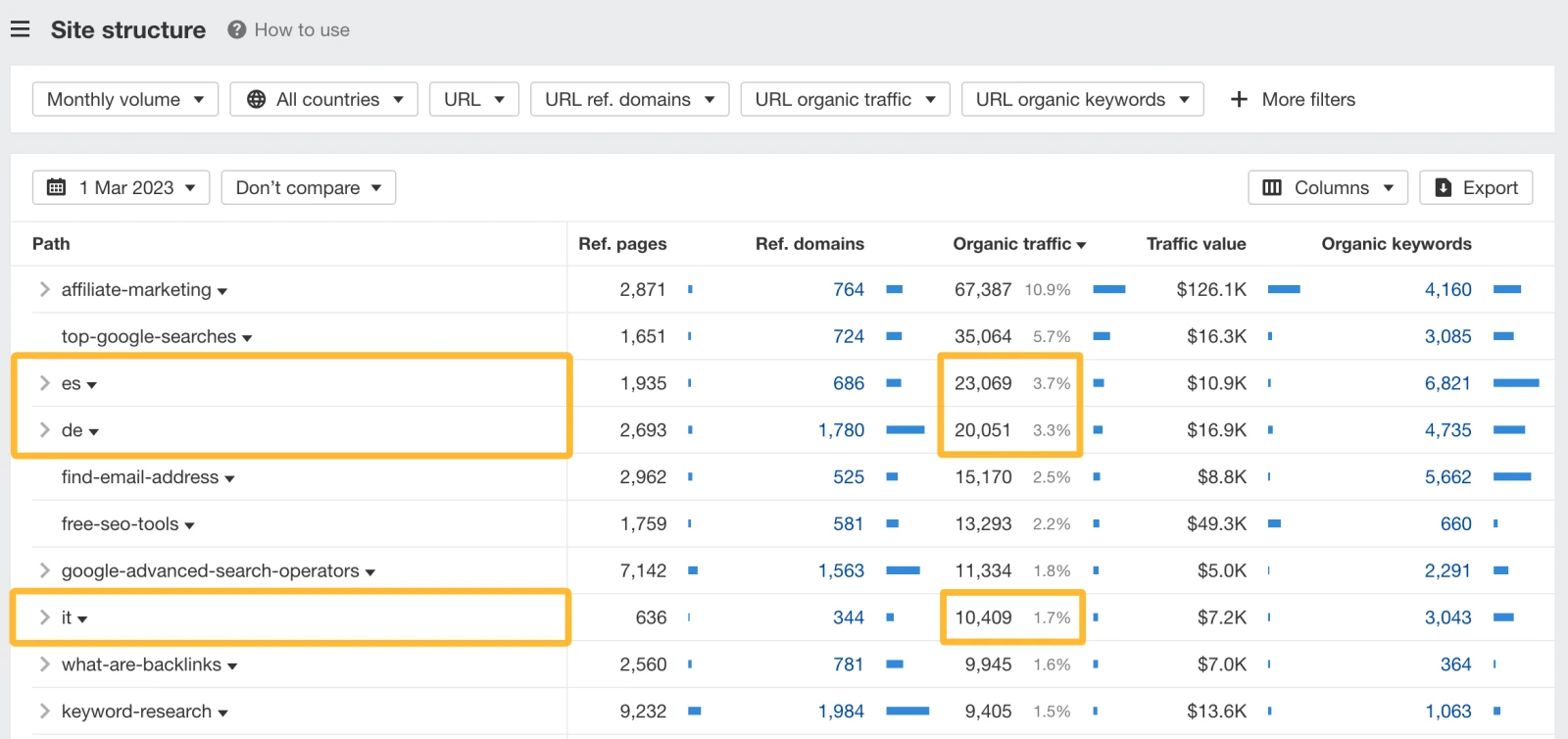
The visible path tree and traffic columns support comparing listed sections. Expand a path to inspect its nested structure. Screenshot source Check related metrics before drawing a conclusion
Use the other visible columns, such as `Traffic value`, only as additional context. A section with substantial estimated traffic value may merit a closer look, but that metric does not replace the organic-traffic comparison.
The report describes its figures as metrics for paths and uses an example where translated blog sections account for a stated share of total organic visits. Do not apply that example’s percentage to another site. Base your conclusion on the values shown for your own target.
How does this Ahrefs setup work in practice?
Compare localized subfolders on a competitor site
An analyst evaluates which international language subfolders on a competitor website generate the largest estimated organic search traffic share.
| Choice | Why it matters | How to check |
|---|---|---|
| Keep the report on one chosen site target and date. | A consistent scope makes the path comparison easier to interpret. | The selected target and date are recorded with the comparison. |
| Compare the es, de, and it paths at the same tree level. | These are language-folder examples visible in the screenshot, so they illustrate a sibling-path comparison. | Each language path has its own Organic Traffic value in the notes. |
| Expand a language path only if its child sections matter to the question. | The tree can reveal nested paths without mixing levels in the first comparison. | The notes label each expanded child as belonging to its parent. |
| Use the comparison to select one section for further review, rather than declaring a winner from a single metric. | Traffic estimates identify areas to investigate. They do not explain why a section performs as it does. | The next action names the selected section and what the analyst wants to examine next. |
Prioritize high-traffic localized sections for deeper keyword analysis while keeping comparisons grounded in the selected reporting timeframe.
How do you verify your result in Ahrefs?
You have a like-for-like view of the listed paths and can identify which sections have larger estimated organic traffic in the selected report. Use that comparison to decide which sections deserve closer investigation. It describes the report’s estimates for the chosen target and date, not a guaranteed traffic total or a forecast.
| Step | What you should see |
|---|---|
| Open Site Structure for the target | The report heading identifies Site Structure, and the tree lists paths for the target you intended to inspect. |
| Find the Organic Traffic column | You can identify the Organic Traffic value for each section in your comparison set. |
| Compare paths at the same tree level | Your comparison names the paths and values, and distinguishes sibling sections from nested paths. |
| Expand a path to inspect its children | The expanded tree shows the child paths beneath the selected parent, and you can still identify the parent row. |
| Check related metrics before drawing a conclusion | Your notes distinguish Organic Traffic from related metrics and do not reuse example figures as findings for another website. |
Related Ahrefs guides include Ahrefs Link Intersect guide and Find broken internal links in Ahrefs Site Audit.
Which official Ahrefs sources were checked?
Every step and limit in this Ahrefs guide was verified against official documentation on 21 Nov 2026 following how we check figures, alongside more walkthroughs in our Ahrefs tutorials hub:
How do you troubleshoot common Ahrefs issues?
Why is a path missing from the tree?
The report presents the structure and metrics available for the selected target. Check that you entered the intended domain or URL and that you are looking at the correct level. The provided evidence does not establish a control for forcing a particular path to appear.
Can I compare a parent folder directly with a child folder?
You can read both rows, but they represent different levels. Treat the parent as a section and the child as a nested path, and do not sum them or assume they are independent totals.
Does Organic Traffic show exact visits?
The report evidence describes path metrics and uses organic traffic as a way to see which sections drive more search traffic. Treat the values as estimates for comparison, not exact analytics counts.
 Reviewed byDanny Kirk
Founder of ReddiReach.
 Checked byAndrés Felipe
Digital designer and marketer.
Every figure is checked against the vendor's own page. Read our editorial standards.