
Key Takeaways
- Ahrefs Site Explorer surfaces competitor paid search landing pages through the Paid pages report, showing destination URLs and associated paid search traffic in one table.
- You need an Ahrefs account with Site Explorer access, a competitor domain, URL, or subsection to inspect, and a defined target country when researching local campaigns.
- The Paid pages report defaults to a global view, so always confirm the country selector matches your market before recording URLs or comparing paid traffic figures.
- Verify completion by confirming your shortlist records each destination URL, displayed paid traffic, active country filter, and Performance chart date range before opening candidate pages.
Find competitor paid search destination URLs in Ahrefs by opening Site Explorer, opening the Paid pages report, and filtering by your target market. Use the Performance chart in Compare pages mode to track how paid search traffic shifts across top landing pages over time.
For plan limits and team seat pricing behind this workflow, read our Ahrefs review or connect Ahrefs to AI agents in Ahrefs API and MCP.
Key steps
What do you need before starting in Ahrefs?
Ahrefs requires the following workspace setup before you begin:
- An Ahrefs account with access to Site Explorer.
- The competitor domain, specific URL, or site subsection you want to investigate.
- A target country to select if your paid search research focuses on a specific geographic market.
- A clear set of landing-page questions, such as which destination pages capture the most paid search traffic or how traffic shifted across pages over time.
How do you complete the steps in Ahrefs?
Follow these 5 steps in Ahrefs in order:
Open the competitor in Site Explorer
Open Ahrefs Site Explorer, enter the competitor website you want to analyze, and choose the target scope that matches your research question. Use a full domain scope when you want to uncover every paid landing page across the site, including dedicated campaign paths or localized subfolders you have not seen before. Choose a narrower URL or subsection scope when your team only cares about a single product line, regional folder, or campaign directory. Checking the scope first prevents broad site-wide pages from crowding out a focused product review.
Open Paid pages and set the market
Open the Paid pages report from Site Explorer to list target pages associated with paid search traffic. By default, the report opens in a global view that aggregates paid page data across markets. Leave the global setting active only when auditing overall international reach. When planning or benchmarking a regional campaign, open the country selector and pick the exact country your ads target so regional landing pages and local paid traffic figures are isolated from unrelated territories.
Review the page URLs and traffic
Scan the URL and traffic columns to spot destination pages attracting notable paid search traffic, paying close attention to dedicated landing-page slugs, product paths, and language subdirectories. In the interface screenshot, the Paid pages table displays monday.com destination URLs, including a Spanish-language path, alongside their paid traffic figures; treat screenshot numbers as a dated interface snapshot rather than live performance benchmarks. Record both the full URL and the displayed traffic figure for each relevant candidate so your team can prioritize which pages warrant deeper inspection.
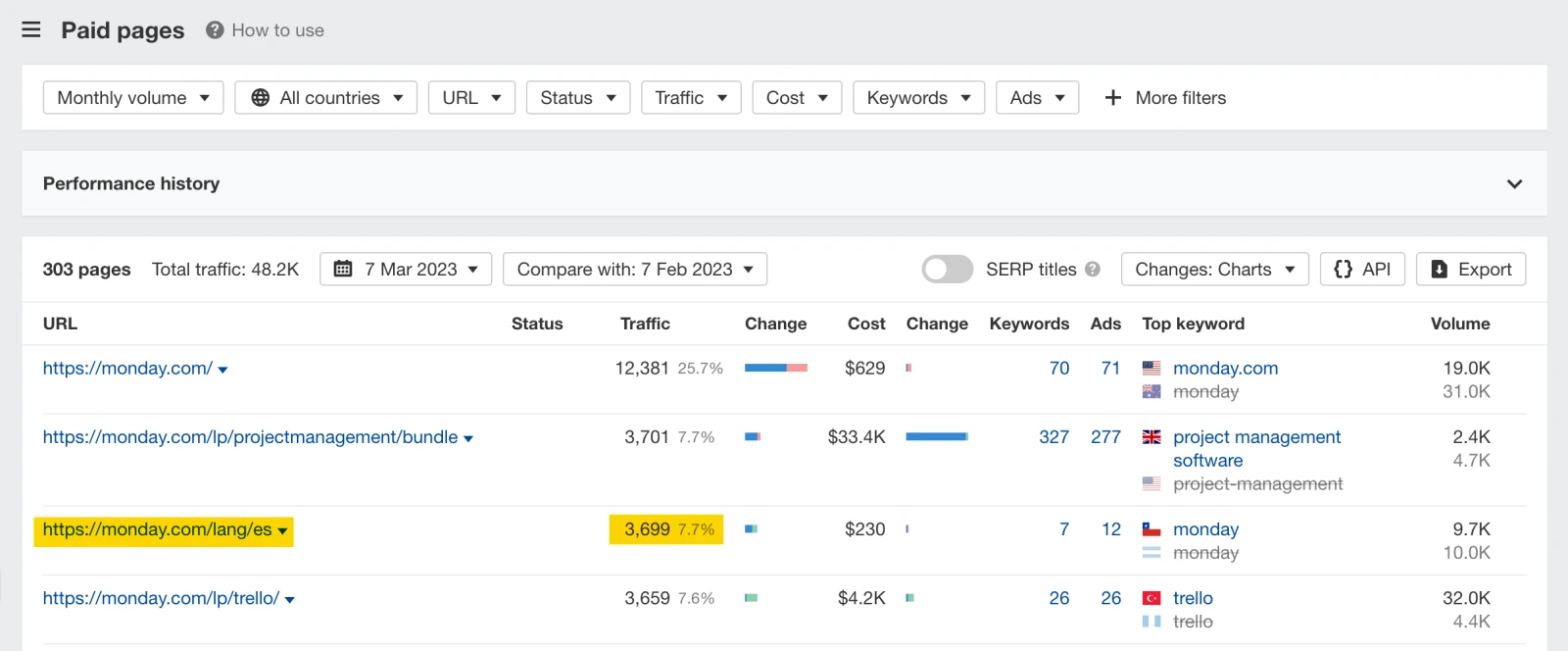
The visible report table lists destination URLs and traffic values, illustrating where the competitor’s paid traffic is associated. Screenshot source Compare page traffic over time
Move to the Performance chart and switch to Compare pages mode to examine how search traffic progressed across the top paid pages over time. Watch for intervals where one landing page climbs while another drops, which can signal seasonal campaign rotations, messaging refreshes, or shifted budget priorities. Always write down the exact date range shown on the Performance chart alongside your notes so anyone reviewing your findings knows the time window behind those traffic movements.
Inspect the strongest candidates
Open each shortlisted destination URL in your browser to evaluate the live landing page directly. Review how the headline, offer structure, call to action, and page layout align with the search intent or campaign question you are researching. Keep the traffic observations from Ahrefs separate from your qualitative judgment about why the competitor uses that page, since paid traffic volume alone does not reveal conversion rates, ad spend profitability, or audience fit for your own offer.
How does this Ahrefs setup work in practice?
Example: auditing regional paid landing pages for a project-management campaign
Scenario: a paid search team preparing a Spanish-speaking market launch uses Ahrefs Site Explorer to review how a project-management software competitor structures its paid destination pages before drafting new landing-page briefs.
| Choice | Why it matters | How to check |
|---|---|---|
| Enter the competitor domain in Site Explorer using a domain-wide scope. | Starting at the domain level reveals localized subfolders and standalone campaign paths that a narrow URL check could miss. | Site Explorer shows the full competitor domain as the active target. |
| Switch the Paid pages country selector from the global default to the target country. | Filtering by a single market prevents English-language global traffic from masking regional Spanish-language landing pages. | The country selector displays the specific target market before any URLs are exported or logged. |
| Record candidate URLs and displayed paid traffic values from the URL and traffic columns. | Capturing the destination path and report traffic side by side gives the team an objective priority order for manual page teardowns. | Each shortlisted row in the research sheet includes the exact URL and visible traffic figure. |
| Check Compare pages mode in the Performance chart, then open the top regional URLs live. | The chart shows whether a page has sustained paid search traffic or a brief spike, while visiting the URL reveals the actual offer and copy. | The chart date range is noted and live page observations are saved separately from traffic data. |
The paid search team shares a focused brief contrasting the competitor page structure with their own audience requirements, then decides whether to adapt an existing regional page or build a dedicated landing page.
How do you verify your result in Ahrefs?
You have a documented shortlist of competitor landing pages receiving paid search traffic in Ahrefs, filtered to the right geographic market and contextualized with historical traffic trends from Compare pages mode. While the Paid pages report surfaces active paid destinations for manual inspection, it does not prove why traffic changed or guarantee that copying a page layout will convert for your own campaigns.
| Step | What you should see |
|---|---|
| Open the competitor in Site Explorer | Site Explorer loads the intended competitor target and displays the domain, URL, or subsection scope that fits your audit. |
| Open Paid pages and set the market | The Paid pages report is open and the country selector displays either your intended target country or the intentional global view. |
| Review the page URLs and traffic | You have logged the exact destination URL and displayed paid traffic figure for every page that matches your campaign scope. |
| Compare page traffic over time | Compare pages mode displays the shortlisted pages and you have recorded the exact date range shown in the Performance chart. |
| Inspect the strongest candidates | You have a vetted shortlist of landing pages with live page notes paired separately alongside each URL, market setting, and chart period. |
Related Ahrefs guides include Ahrefs Link Intersect guide and Find broken internal links in Ahrefs Site Audit.
Which official Ahrefs sources were checked?
Every step and limit in this Ahrefs guide was verified against official documentation on 21 Nov 2026 following how we check figures, alongside more walkthroughs in our Ahrefs tutorials hub:
How do you troubleshoot common Ahrefs issues?
Why do the listed landing pages change when I switch countries in Paid pages?
Paid pages defaults to a global view and recalculates both the page list and paid search traffic figures when you select a specific country. Competitors often route different markets to localized URLs or run separate regional campaigns, so always verify the country selector before comparing reports.
What does Compare pages mode show in the Performance chart?
Compare pages mode plots the search traffic progression of top paid pages over time inside the Performance chart, letting you see when specific destination URLs gained or lost paid traffic relative to each other. Always record the displayed chart date range so your trend notes stay accurate.
Does high paid traffic in Ahrefs prove a competitor landing page converts well?
No. Paid traffic figures in the Paid pages report reflect search traffic associated with those paid URLs, not conversion rates, lead quality, or return on ad spend. Always inspect the live landing page and test assumptions against your own campaign goals and audience.
 Reviewed byDanny Kirk
Founder of ReddiReach.
 Checked byAndrés Felipe
Digital designer and marketer.
Every figure is checked against the vendor's own page. Read our editorial standards.