
Key Takeaways
- Use Ahrefs Site Explorer's Referring domains report to view all unique external websites pointing to any domain, subfolder, or individual web page.
- Log in to your Ahrefs account with Site Explorer permissions and specify the precise domain, path, or URL target for analysis.
- Follow 5 structured steps to input the target in Site Explorer, access Referring domains, apply sorting filters, inspect individual links, and prioritize domains.
- Check that the domain table lists unique referring domains with Domain Rating metrics, total backlink counts, and expanding backlink detail views.
Ahrefs Site Explorer provides a Referring domains report that lists every unique domain linking to a target website, URL, or subfolder. Inspect domain authority metrics, linked page counts, and individual backlink anchor texts to evaluate external link equity.
For plan limits and team seat pricing behind this workflow, read our Ahrefs review or connect Ahrefs to AI agents in Ahrefs API and MCP.
Key steps
What do you need before starting in Ahrefs?
Ahrefs requires the following workspace setup before you begin:
- An Ahrefs account.
- The exact domain, URL, or subsection you want to investigate.
- A clear target scope: use the whole domain when you want links across the site, or a narrower target when that is what you need to examine.
How do you complete the steps in Ahrefs?
Follow these 5 steps in Ahrefs in order:
Open the target in Site Explorer
In Ahrefs, open Site Explorer and enter the target you want to analyze. Choose the scope that matches your question: a whole domain for site-wide links, or a URL or subsection for a narrower view. The report represents the target and scope you entered, so check those before interpreting the results.
Open Referring domains
Go to the Referring domains report. It lists unique websites pointing to the target. This is a domain-level view: it helps answer which websites link to the target, while the report’s link count can help show how often each one has linked.
Narrow or sort the domain list
Use the available filters and columns to focus the list. For a competitor review, the Dofollow filter can narrow results to domains with dofollow links. Sorting by traffic can help surface domains with more traffic. If you are looking for repeat linkers, sort by Links to target or Dofollow links and look for a range such as 10–50 links, as a way to identify domains worth inspecting.
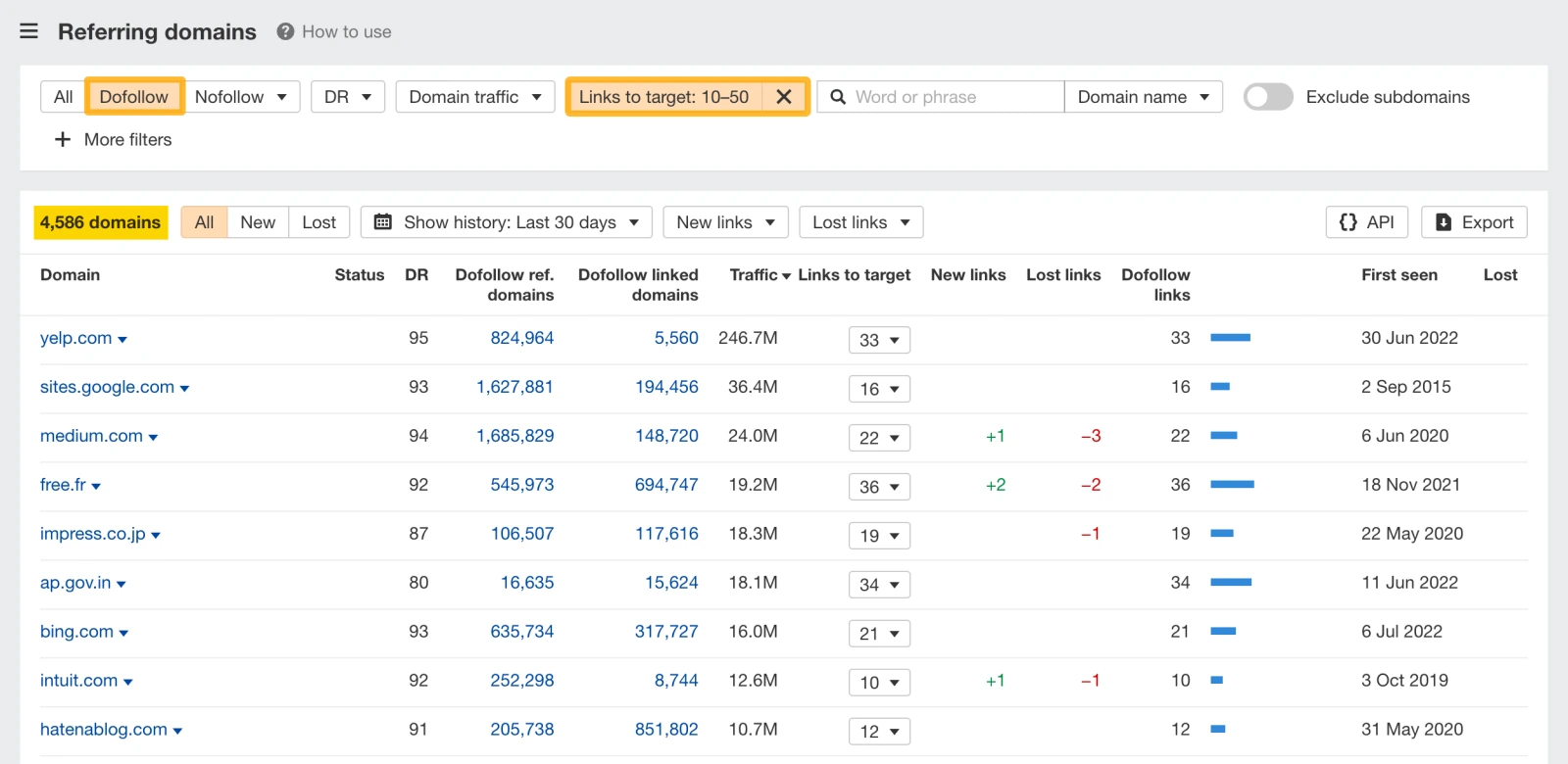
The visible report illustrates filtering for repeat linkers and sorting or reviewing domain metrics. Screenshot source Inspect a domain’s backlinks
When a domain looks relevant, click the caret under Links to target to reveal the backlinks from that referring domain to your target. Review the referring pages, anchor text and target URLs, and the First seen information to understand the contexts and timing visible in the report.
Choose a follow-up based on the evidence
Use the detail view to decide whether a domain is worth further review. A domain linking from multiple pages, in varied contexts, or over a meaningful span of time may merit attention. If evaluating competitor links, look for referring domains that mention multiple competitors but not your target, then decide whether a relevant outreach opportunity exists.
How does this Ahrefs setup work in practice?
Worked example: reviewing referring domains for a project management platform
A digital marketing team examines the referring domain profile of a software platform to understand its external authority and identify outreach leads.
| Choice | Why it matters | How to check |
|---|---|---|
| Enter the competitor’s site as the target and open Referring domains. | This frames the report around the websites linking to that competitor. | The report header and target scope match the intended competitor. |
| Sort or filter to surface domains with repeat links, then inspect a domain in the 10–50 Links to target range. | This uses the source’s suggested range to identify serial linkers for closer examination. | The chosen domain’s count is visible and its individual backlinks can be opened. |
| Review referring pages, anchor and target URL, and First seen for the selected domain. | These details show the contexts and timing of the links, helping distinguish a relevant prospect from a count alone. | There is a concrete reason recorded for keeping or dropping the domain from further review. |
| Compare whether that domain links to multiple competitors but not the target. | A gap may justify checking whether there is a relevant outreach opportunity. | The next decision is whether the domain’s pages and context are appropriate to pursue. |
Evaluate individual referring domains based on editorial relevance and link placement context before adding candidate sites to your outreach pipeline.
How do you verify your result in Ahrefs?
You now have a list of unique websites linking to the target, plus a way to inspect the individual backlinks behind a domain’s count. Treat the report as a prospecting and analysis view: a larger count or traffic figure is a clue to examine, not by itself a decision to pursue a link.
| Step | What you should see |
|---|---|
| Open the target in Site Explorer | The target shown in Site Explorer is the intended site, page, or subsection. |
| Open Referring domains | You can see a list of referring domains for the selected target. |
| Narrow or sort the domain list | The list is ordered or filtered according to the question you are investigating. |
| Inspect a domain’s backlinks | You can see the individual backlinks associated with a selected referring domain. |
| Choose a follow-up based on the evidence | You have a short list of domains with a specific reason for further review or no follow-up. |
Related Ahrefs guides include Ahrefs Link Intersect guide and Find broken internal links in Ahrefs Site Audit.
Which official Ahrefs sources were checked?
Every step and limit in this Ahrefs guide was verified against official documentation on 21 Nov 2026 following how we check figures, alongside more walkthroughs in our Ahrefs tutorials hub:
How do you troubleshoot common Ahrefs issues?
Why does the report show domains instead of every backlink?
Referring domains groups links by the unique websites pointing to the target. Open the caret under Links to target for the individual backlinks from a domain.
How can I focus on domains that link repeatedly?
Sort by Links to target or Dofollow links and inspect domains with a higher count. The source suggests 10–50 links as a range for finding serial linkers, but review the individual backlinks before deciding they are useful.
How should I use the Dofollow filter?
Apply it when you specifically want to narrow the list to domains passing link equity. If your question is broader, review the full list before filtering.
 Reviewed byDanny Kirk
Founder of ReddiReach.
 Checked byAndrés Felipe
Digital designer and marketer.
Every figure is checked against the vendor's own page. Read our editorial standards.