
Key Takeaways
- Configure Ahrefs Site Audit crawl settings by selecting Specific sitemaps as the URL source and defining Max depth level from seed as 0.
- Ensure you have an active Ahrefs account with Site Audit credits and possess the exact, accessible XML sitemap URLs for your target domain.
- Execute the 6-step configuration by opening settings, setting sitemap URL sources, adjusting depth to zero, saving configuration, running a fresh crawl, and verifying scope.
- Verify the crawl scope in Page Explorer by filtering for Is in sitemap = Yes and confirming the total crawled page count matches your sitemap count.
Configure an Ahrefs Site Audit project to restrict crawl activity exclusively to URLs specified in an XML sitemap file. Setting seed crawl depth to zero prevents the crawler from discovering extraneous links and keeps audit credit usage focused on designated pages.
For plan limits and team seat pricing behind this workflow, read our Ahrefs review or connect Ahrefs to AI agents in Ahrefs API and MCP.
Key steps
What do you need before starting in Ahrefs?
Ahrefs requires the following workspace setup before you begin:
- An Ahrefs project or the information needed to create one, including the project scope and ownership details.
- The exact sitemap URL or URLs you want Site Audit to use.
- For an existing project, access to its Site Audit settings and the ability to start a new crawl.
How do you complete the steps in Ahrefs?
Follow these 6 steps in Ahrefs in order:
Open the Site Audit settings
For a new project, proceed through project setup to the Site Audit section. For an existing project, open the Site Audit dashboard, use the vertical ellipsis beside the project, and choose Settings. In the settings panel, select Site Audit.
Use only the sitemap as a URL source
Open URL Sources. Select Specific sitemaps and enter the exact sitemap URL. Add another sitemap URL if your intended crawl should start from more than one sitemap. Leave every other URL source unchecked, including Website, Auto-detected sitemaps, Custom URL list, and Backlinks when those labels are shown.
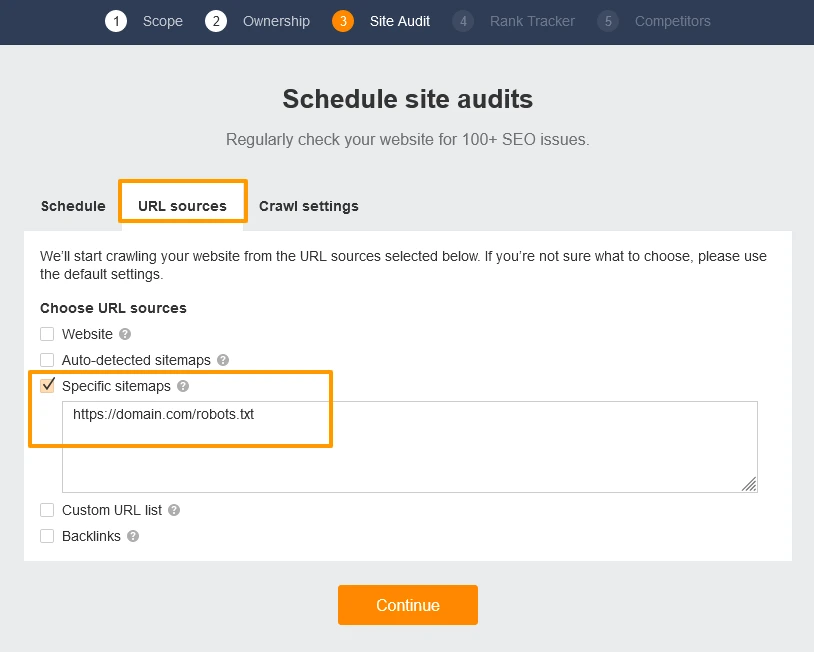
The visible URL Sources controls show Specific sitemaps and the sitemap URL field. Screenshot source Set the crawl depth to zero
Open Crawl settings and find Max depth level from seed. Set it to 0. This setting limits how far the crawler follows links from the sitemap URLs, so it does not continue deeper into the site from those starting pages.
Save the setup or settings
For a new project, continue through the Site Audit section and complete the remaining required project setup. For an existing project, finish the settings changes. A settings change alone does not update previously collected crawl data.
Run a fresh crawl for an existing project
If you changed an existing project, return to it in Site Audit and start a new crawl. Wait for that crawl to complete before checking the results. A new crawl is necessary for the updated settings to apply.
Confirm the pages in scope
Open Page explorer and filter for Is in sitemap = Yes. Compare the resulting page count with the number of crawled URLs. The Crawl log may show more known URLs than crawled URLs. Known URLs can include URLs that were discovered but discarded from the project's scope.
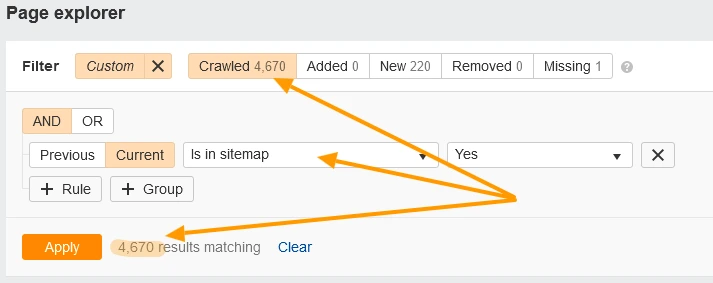
The Page explorer view shows the Is in sitemap rule and filtered result count. Screenshot source
How does this Ahrefs setup work in practice?
Worked example: restricting an audit crawl to an ecommerce product sitemap
An SEO consultant needs to audit a newly migrated product catalog without consuming crawl credits on unrelated blog articles, tag archives, or forum sections.
| Choice | Why it matters | How to check |
|---|---|---|
| Enter the exact product sitemap URL under Specific sitemaps. | That sitemap is the intended starting source for this scenario. | The field contains the intended URL and no other URL source is selected. |
| Set Max depth level from seed to 0. | The goal is to avoid following links beyond sitemap URLs. | The value shown is 0 before the setup is continued. |
| Complete the project setup and wait for the crawl to finish. | The pages and counts need to come from a completed crawl. | The Crawl log shows the new crawl's results. |
| Filter Page explorer to Is in sitemap = Yes and compare counts. | This checks the pages marked as in the sitemap against the crawl count. | The hypothetical comparison would be recorded only after observing the actual counts. |
Confirm the completed crawl log and Page Explorer show only the URLs specified in the product sitemap without expanding into secondary internal links.
How do you verify your result in Ahrefs?
The completed crawl is configured to include the sitemap URLs as its starting source without following links beyond depth 0. Page explorer's Is in sitemap = Yes filter gives you a practical count check against crawled pages. The Crawl log's known URL count can be higher because it can include discovered URLs outside the crawl scope.
| Step | What you should see |
|---|---|
| Open the Site Audit settings | You are in the Site Audit setup or settings, with the URL Sources and Crawl settings tabs available. |
| Use only the sitemap as a URL source | Specific sitemaps is the only selected source, and the field contains the sitemap URL or URLs you intend to use. |
| Set the crawl depth to zero | Max depth level from seed displays 0 before you continue. |
| Save the setup or settings | The project is configured with the sitemap-only source and depth 0. |
| Run a fresh crawl for an existing project | The new crawl has completed and its results are available in the Crawl log. |
| Confirm the pages in scope | The sitemap filter is applied, and its result count matches the crawled page count for the completed crawl. |
Related Ahrefs guides include Ahrefs Link Intersect guide and Find broken internal links in Ahrefs Site Audit.
Which official Ahrefs sources were checked?
Every step and limit in this Ahrefs guide was verified against official documentation on 21 Nov 2026 following how we check figures, alongside more walkthroughs in our Ahrefs tutorials hub:
How do you troubleshoot common Ahrefs issues?
Why is the known URL count higher than the crawled URL count?
Known URLs can include discovered URLs that were discarded because they were outside the configured project scope. Check the crawled count against Page explorer filtered to Is in sitemap = Yes.
Why did my existing project's results not change after I edited settings?
The settings apply to a new crawl. Start a new crawl from the project and check the Crawl log after it completes.
Why does the sitemap filter count differ from the crawled page count?
First confirm the new crawl is complete and that the Page explorer filter is exactly Is in sitemap = Yes. Then compare the filtered count with that crawl's crawled page count. If they still differ, recheck the selected URL source and depth setting for the crawl.
 Reviewed byDanny Kirk
Founder of ReddiReach.
 Checked byAndrés Felipe
Digital designer and marketer.
Every figure is checked against the vendor's own page. Read our editorial standards.