
Key Takeaways
- Use Surfer SEO Audit to benchmark a live URL's SEO Score, keywords, headings, word counts, images, load speed, and internal links against top-10 SERP competitors.
- Confirm your published URL, exact target keyword, country or city location, and Desktop crawler or Mobile crawler before creating the query.
- Complete five steps: create the Audit query, curate competitors, review SEO Score and keyword/NLP actions, check structure and inbound internal links, and Refresh or Share.
- Confirm improvements by clicking Refresh after publishing CMS edits so Surfer re-crawls your URL and updates your SEO Score.
Benchmark a published webpage against top-ranking Google results in Surfer SEO Audit to uncover keyword, NLP, structure, and internal link gaps. Filtering out mismatched high-authority domains and refreshing your URL after edits gives your team a verifiable optimization checklist.
For plan limits and team seat pricing behind this workflow, read our Surfer SEO review or connect Surfer SEO to AI agents in Surfer SEO API and MCP.
Key steps
What do you need before starting in Surfer SEO?
Surfer SEO requires the following workspace setup before you begin:
- Active Surfer SEO account with access to the Audit tool
- Published, crawlable webpage URL to benchmark against Google SERPs
- Verified exact keyword, target country or city, and mobile or desktop crawler choice
How do you complete the steps in Surfer SEO?
Follow these 5 steps in Surfer SEO in order:
Create an Audit query with keyword, location, and crawler
Open Audit in Surfer SEO, enter your exact keyword and URL, choose country or city location, pick Desktop crawler or Mobile crawler, and click Create Audit.
Verify inputs first because keyword, URL, location, and crawler lock permanently once created. Compare results against the matching mobile or desktop version of your site.
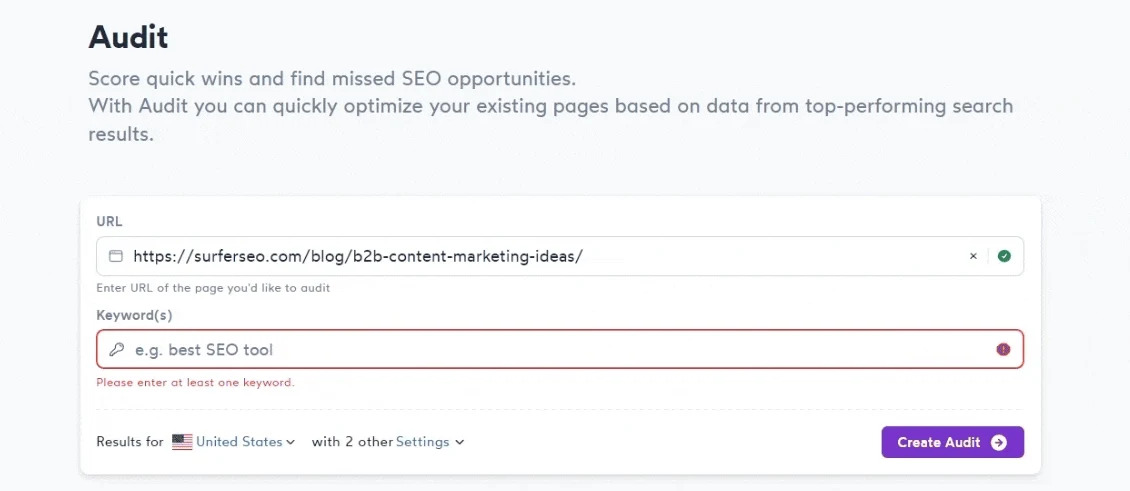
Verify your exact keyword, page URL, location, and crawler before clicking Create Audit because parameters lock after creation. Screenshot source Curate benchmark pages with Select competitors
Click the Gear icon or Select competitors to review top-10 Google pages, and select at least three competitors with a 60+ score.
Deselect high-authority, low-score domains like Wikipedia, Quora, or Amazon, and exclude mismatched intent such as e-commerce pages when auditing a blog.
Review SEO Score, exact and partial keywords, and NLP terms
Check SEO Score (0 to 100) and each Action prompt to add, remove, or keep counts unchanged. Inspect Exact keyword usage, NLP terms by Relevance percentage, and Partial keywords (matching the first three letters).
Place at least one exact keyword in your title or H1 and prioritize NLP terms before Partial keywords. Ranges span from the competitor average to the highest-count competitor.
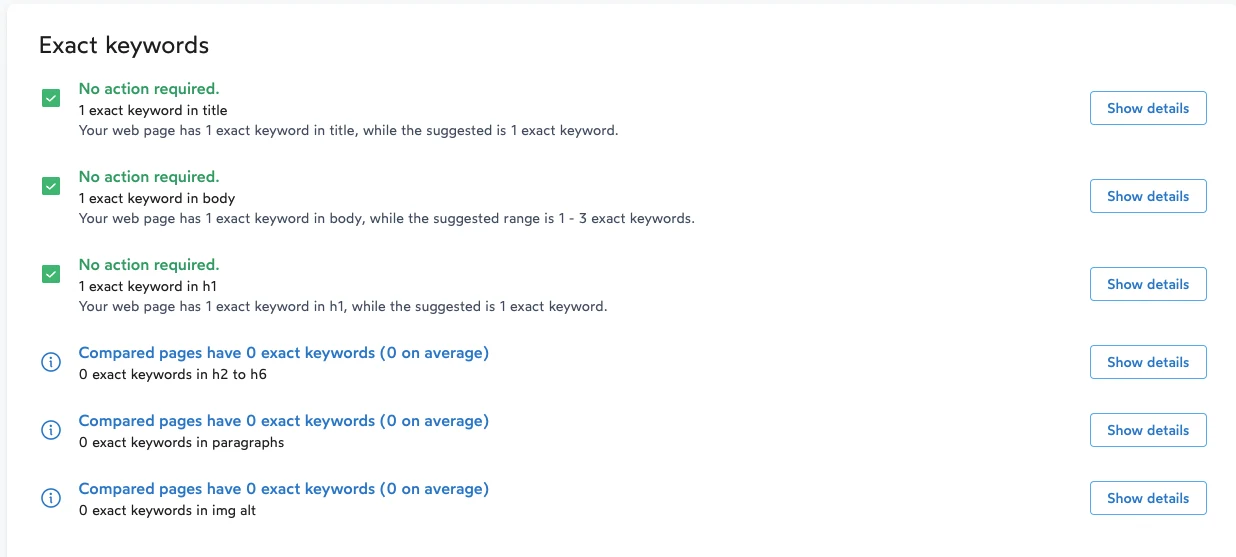
Check Exact keyword occurrences and Action guidance to ensure your title and H1 include your primary phrase. Screenshot source Inspect headings, unlinked content counts, and internal links
Verify one H1 tag, clear H2 through H6 subheadings, and aligned body words, bold words, images, and load time. Check Internal links for domain URLs found via site search.
Hyperlinked text, linked headings, linked images, and CSS-hidden elements are excluded from counts. Add links *on* suggested Internal links pages pointing *to* your audited URL.
Refresh your live page, share the Audit, and mark as done
Publish site edits, return to Audit, and click Refresh to re-crawl your URL. Click Share in the top-right corner to copy a public URL, and click Mark as done (check icon).
Refresh re-crawls only your page, not competitors, so create a new query for a fresh SERP scan. Anyone can view the Share link without a login.
How does this Surfer SEO setup work in practice?
Worked example: Auditing a B2B content marketing guide
An SEO specialist audits an existing blog post targeting b2b content marketing to close on-page gaps against page-one guides.
| Choice | Why it matters | How to check |
|---|---|---|
| Open Select competitors, pick four 60+ score blogs, and exclude Wikipedia and Quora | Removes authority outliers so target ranges reflect well-optimized B2B articles. | Word and heading ranges recalibrate to the four B2B competitors. |
| Add b2b content marketing to the single H1 and unlinked body copy plus top NLP terms | Unlinked keyword and NLP occurrences count directly toward SEO Score. | Keyword and NLP Action rows turn green after clicking Refresh. |
| Add inbound links pointing to the audited URL from three suggested Internal links pages | Suggested domain URLs pass internal link equity toward the audited article. | Three related articles on the site now link to the audited guide. |
After publishing edits and clicking Refresh, the specialist confirms the higher SEO Score, copies the Share link for stakeholders, and clicks Mark as done.
How do you verify your result in Surfer SEO?
Click Refresh after publishing updates to verify your SEO Score rises and priority Action items fall in range. Share the login-free Share URL with stakeholders and click Mark as done.
| Step | What you should see |
|---|---|
| Create an Audit query with keyword, location, and crawler | Your Audit report opens displaying an initial SEO Score and metric rows. |
| Curate benchmark pages with Select competitors | Suggested ranges and SEO Score recalculate around your chosen competitors. |
| Review SEO Score, exact and partial keywords, and NLP terms | You have a prioritized list of exact phrases, NLP entities, and partial terms. |
| Inspect headings, unlinked content counts, and internal links | Heading, unlinked content, and inbound link edits are ready for your CMS. |
| Refresh your live page, share the Audit, and mark as done | Refreshed metrics reflect live edits and a green check mark appears on your dashboard. |
Related Surfer SEO guides include How to configure workspace Brand Knowledge in Surfer SEO and How to create and optimize articles in Surfer SEO Content Editor.
Which official Surfer SEO sources were checked?
Every step and limit in this Surfer SEO guide was verified against official documentation on 27 Nov 2026 following how we check figures, alongside more walkthroughs in our Surfer SEO tutorials hub:
How do you troubleshoot common Surfer SEO issues?
Why does Surfer Audit report fewer words or images than appear on my webpage?
Surfer excludes hyperlinked text, bold words, headings, and images (plus CSS-hidden elements) so menus and outgoing links do not distort counts. Also verify you view your mobile site when using Mobile crawler.
Do I link out from my audited page to the URLs in Internal links?
No, Internal links lists existing domain pages that should link *to* your audited page. Edit those source pages in your CMS to point anchor links toward the audited URL.
Does clicking Refresh re-crawl competitor pages and update SERP rankings?
No, Refresh only re-crawls your audited URL against the saved benchmark. Create a new Audit query whenever you want Surfer to re-crawl the SERP and competitors.
 Reviewed byDanny Kirk
Founder of ReddiReach.
 Checked byAndrés Felipe
Digital designer and marketer.
Every figure is checked against the vendor's own page. Read our editorial standards.