
Key Takeaways
- tawk.to delivers a free live chat widget, shared support inbox, and self-service knowledge base without imposing per-seat licensing fees on support teams.
- tawk.to offers its core software entirely free, charging $29 monthly for AI Assist capabilities and an optional $29 monthly per-property whitelabel fee.
- tawk.to powers its AI Assist using customer knowledge bases while supplying documented developer APIs and webhooks for custom technical integrations.
- tawk.to charges add-on fees to remove its branding and requires separate modular purchases rather than bundling advanced automation quotas into one plan.
If your support budget needs to go toward people answering questions, tawk.to gives you free live chat, a knowledge base and a shared inbox without seat fees. Read the Tidio review if you need a paid help desk with its own AI-agent and automation quotas from the outset, or the Trengo review if WhatsApp is the center of a larger omnichannel operation.
Agent access
- API
- Yes
- MCP server
- Not found on official pages
- Automation
- Zapier, Make
What are the primary pros and cons of using tawk.to?
What works
- Free live chat with unlimited team members
- Shared inbox for web, email and messaging channels
- Free knowledge base with support for more than 50 languages
What to watch
- Removing the tawk.to badge costs $29 per property each month
- AI Assist has a limited-volume free tier alongside paid plans from $29 a month
- Voice Agents and Data Enrichment are shown with waitlist links
What live chat and ticketing capabilities does tawk.to provide?
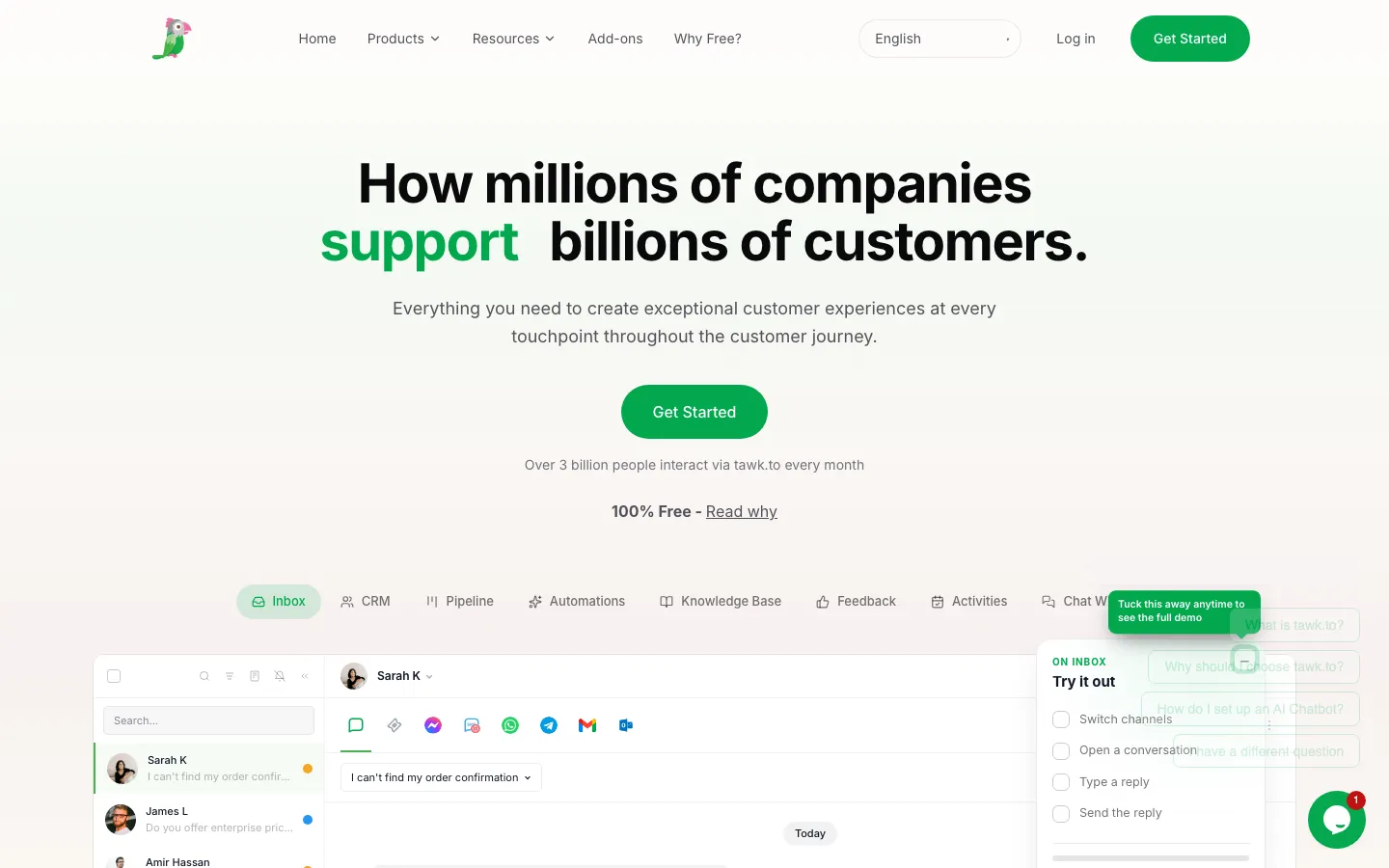
tawk.to gives a support team the basic system it needs to answer a website visitor: a live-chat widget for the site and an inbox where teammates can pick up the conversation. The free platform also includes a knowledge base and no per-seat charge, which makes it a sensible first move when the real constraint is coverage rather than software budget.
The inbox reaches beyond the site widget. tawk.to lists live chat, email, WhatsApp, Facebook Messenger and SMS as channels it can centralize. That can prevent a question from disappearing into one person’s phone or mailbox, but it does not create an operating model for you. Decide who owns each queue, what gets transferred and when a customer should expect a reply before opening every channel.
The platform becomes a different purchase once your team wants automation or a fully branded front door. AI Assist offers AI agents and workflows, with paid plans starting at $29 a month. Whitelabel, also $29 a month per property, removes the badge and adds custom domains for the widget, Chat Page, Knowledge Base and related touchpoints. The low entry price is real, but the choice should follow the support job, not the temptation to turn everything on.
Which support teams and businesses benefit most from tawk.to?
Small support teams
Use free live chat and unlimited members when several people need to share website questions without seat fees.
Service businesses
Bring chat, email and messaging conversations into one inbox when the team needs clearer handoffs and ownership.
Teams building self-service
Publish a free knowledge base when repeated customer questions need an answer before they become a chat.
Product and engineering teams
Use the JavaScript API or webhooks when chat events and visitor context must connect to another system.
It is less compelling for a team that must present every customer-facing surface in its own brand on day one. Whitelabel is clearly priced, but it is per property, so an agency or multi-brand business should count every property before calling tawk.to free. It also is not the right bet if a future-facing voice or enrichment feature is essential now: both are presented with waitlist links.
Which customer communication and knowledge base tools are included in tawk.to?
Live chat and team handoff
Live chat is free and tawk.to says teams can add unlimited members. The product includes shortcuts, canned replies, transfers, departments and triggers, so a support lead can route a billing question differently from a sales question. Those controls are useful because free access only helps when the customer gets a consistent answer. Give departments an owner and keep a short set of approved replies for the questions that recur.
One inbox for customer conversations
The shared inbox brings live chat, email, WhatsApp, Facebook Messenger and SMS together. For a team moving from scattered inboxes, that is the practical value: a colleague can see the conversation and continue it rather than asking the customer to repeat themselves. Start with the channels your team already monitors. Adding a channel that nobody can cover makes the experience worse, not broader.
A free knowledge base
The Knowledge Base is free and supports a help center in more than 50 languages. It includes search, categories, tags and related articles, while tawk.to says published articles can also inform AI replies. The strongest use is straightforward: document the handful of questions that repeatedly stop a teammate, then make those articles the source of truth. A neglected help center makes automated replies less useful, so assign an owner before relying on it for deflection.
AI Assist for routine conversations
AI Assist is an optional add-on with a limited-volume free tier and paid plans from $29 a month. tawk.to describes AI agents trained on the knowledge base, workflows for routine tasks and a handoff to a human with context attached. That is a better proposition for a team that has already written and maintained its answers than for one hoping an agent will solve an unclear support process. Treat the knowledge base as the product requirement, not an afterthought.
Developer tools and integrations
For an engineering team, tawk.to exposes a JavaScript API, webhooks and Zapier integration. The JavaScript API can control the widget and set visitor attributes; webhooks cover chat starts, chat ends, transcripts and ticket creation. Zapier connects to more than 1,500 apps. That gives you credible ways to move chat activity into your own stack, but it is not the same as a documented MCP server. If an AI agent needs chat data, design the webhook or integration path around the events it actually needs.
How does tawk.to structure its free model and paid add-ons?
Price checked 27 Nov 2026
| Plan detail | Platform$0 | AI AssistFrom $29/mo | Whitelabel$29/mo |
|---|---|---|---|
| Billing basis | Free platform | Monthly add-on | Per property, monthly |
| Published scope | Live chat and unlimited team members | Limited free tier, agents and workflows | Remove badge and use custom domains |
| Knowledge-base connection | ✓ | Answers and workflows use it | Custom-domain branding |
| Badge removed | ✕ | ✕ | ✓ |
Prices shown with the vendor's $ symbol, checked 27 Nov 2026.tawk.to add-ons
There is no conventional seat calculation to make. The base platform remains $0 whether one person or many people handle chats. The bill changes when you choose add-ons and when your operation has more than one property:
- AI Assist has a limited-volume free tier, with paid plans from $29 a month.
- Whitelabel costs $29 a month for each property, not for each seat.
- Voice Agents start at $49 a month plus usage, but the page directs buyers to a waitlist.
- Data Enrichment starts at $59 a month and is billed per property, with a waitlist link.
For example, two branded properties with Whitelabel and two AI Assist subscriptions at the $29 starting price would start at $116 a month: $58 for two Whitelabel properties and $58 for AI Assist. Compare that starting total, subject to the AI Assist plans you choose, with a paid support suite if the brand experience and automation are required.
Where does tawk.to fall short for scaling help desk operations?
tawk.to encounters its primary limitation in operational scaling rather than in basic chat feature gaps. Unlimited teammates can join the inbox, yet a customer still needs a timely, accurate answer. tawk.to offers departments, transfers and triggers, but those do not decide who is on duty or what happens after an unanswered message. Teams that need rigid workload controls should map their own routing and escalation process before they commit.
Branding is the second boundary. The free widget carries tawk.to branding, and custom domains are part of the $29-per-property Whitelabel add-on. For a single small site that can be a fair trade. For an agency running several client properties, it turns a free platform into a recurring portfolio cost.
Finally, the future-looking add-ons should not be treated as present-day commitments. Voice Agents and Data Enrichment have published starting prices, but their calls to action are waitlist links. That leaves availability and practical terms to confirm before they can appear in a support plan.
What are the top alternatives to tawk.to for customer messaging?
 tawk.to competitors like Tidio offer more unified automation frameworks by bundling their Lyro AI agent and automated conversation flows. Its free plan and paid usage quotas make the budget more structured, but they also make volume planning more important than it is with tawk.to’s free core.
 Trengo is the better comparison for a service-led team whose customer work already happens in WhatsApp, email, live chat, social and voice. It bundles users and annual conversation allowances from a paid base, so it suits a more defined omnichannel operation rather than a no-cost chat launch.
If you are still choosing a starting point, browse the marketing tools directory as a directory of the site’s categories, then come back to the support tools that match the channels your customers actually use.
What is the final verdict on adopting tawk.to?
tawk.to delivers a highly practical free support foundation for small teams capable of managing incoming live chat queues internally. A shared inbox and knowledge base cover the first version of a workable customer-conversation system. I would not choose it merely because it is free: choose it when your team can own the responses and keep the answers current.
Launch the free chat and knowledge base for one property, name the people responsible for each queue, then add AI Assist only after your help articles cover the routine questions. Price Whitelabel across every property before promising a fully branded experience.
How was this tawk.to platform review researched and validated?
tawk.to product features, add-on costs, and developer API resources were audited on 27 Nov 2026. Prices use the vendor's $ symbol, and the figures follow how we check figures.
- tawk.to live chat, inbox and Knowledge Base pages
- tawk.to add-ons and Why Free pages
- tawk.to developer page for the JavaScript API, webhooks and integrations
What are the most frequent questions about deploying tawk.to?
Is tawk.to really free?
Yes. tawk.to describes its platform as free and includes live chat with unlimited team members. It charges for optional add-ons such as AI Assist and Whitelabel.
How much does tawk.to cost for a team?
The core platform is $0 with no per-seat fee. AI Assist has a limited-volume free tier and paid plans from $29 a month; Whitelabel costs $29 a month for each property.
Does tawk.to offer an AI agent?
Yes. AI Assist uses AI agents and workflows based on your knowledge base, with a limited-volume free tier and paid plans from $29 a month.
Can developers connect tawk.to to other tools?
Yes. tawk.to documents a JavaScript API, webhooks and an integration option. Its webhook events include chat starts, chat ends, transcripts and ticket creation.
 Reviewed byDanny Kirk
Founder of ReddiReach.
 Checked byAndrés Felipe
Digital designer and marketer.
Every figure is checked against the vendor's own page. Read our editorial standards.