
Key Takeaways
- Customize deal pipeline stages in HubSpot Sales Hub to align visual deal boards with your team's actual sales qualification steps.
- Ensure your user account holds Edit Property Settings permissions in HubSpot Sales Hub before modifying sales pipelines or stages.
- Follow five direct steps to open pipeline settings, select pipelines, adjust stage names, assign win probabilities, and save arrangements.
- Verify changes by loading the HubSpot deal board view to confirm updated stage columns and weighted revenue figures display accurately.
Add, rename, reorder, and assign win probabilities to deal stages in HubSpot Sales Hub to mirror your real-world sales process. Structuring accurate pipeline stages ensures clean pipeline forecasting and realistic weighted revenue calculations across deal boards.
For plan limits and team seat pricing behind this workflow, read our HubSpot Sales Hub review or connect HubSpot Sales Hub to AI agents in HubSpot Sales Hub API and MCP.
Key steps
What do you need before starting in HubSpot Sales Hub?
HubSpot Sales Hub requires the following workspace setup before you begin:
- Edit property settings permissions to create or edit pipelines and stages.
- Know which sales process the pipeline represents and the sequence of stages that deals pass through.
- If creating a separate pipeline, confirm that the process has distinct stages. The source recommends using one pipeline when processes share the same stages.
How do you complete the steps in HubSpot Sales Hub?
Follow these 5 steps in HubSpot Sales Hub in order:
Open the deal pipeline settings
In HubSpot, click the settings icon in the top navigation. In the left sidebar, select Data Management > Objects. Choose Deals from Select an object, then open the Pipelines tab. The screenshot shows the pipeline stage editor, including a stage list and controls for pipeline rules and automation.
Choose the pipeline to update
Open the pipeline you want to configure. Confirm it represents the process you are changing. If the same sales stages apply across teams, the source guidance recommends using the same pipeline and managing access through user permissions. A separate pipeline is suited to a process with distinct stages.
Add or edit stage names
Use the stage controls in the pipeline editor to add a stage or change an existing stage name. Keep each name tied to a recognizable point in the deal process. The screenshot shows existing deal stages and a Manager Approved stage in the list. That is the visible interface example, not a required stage name for your pipeline.
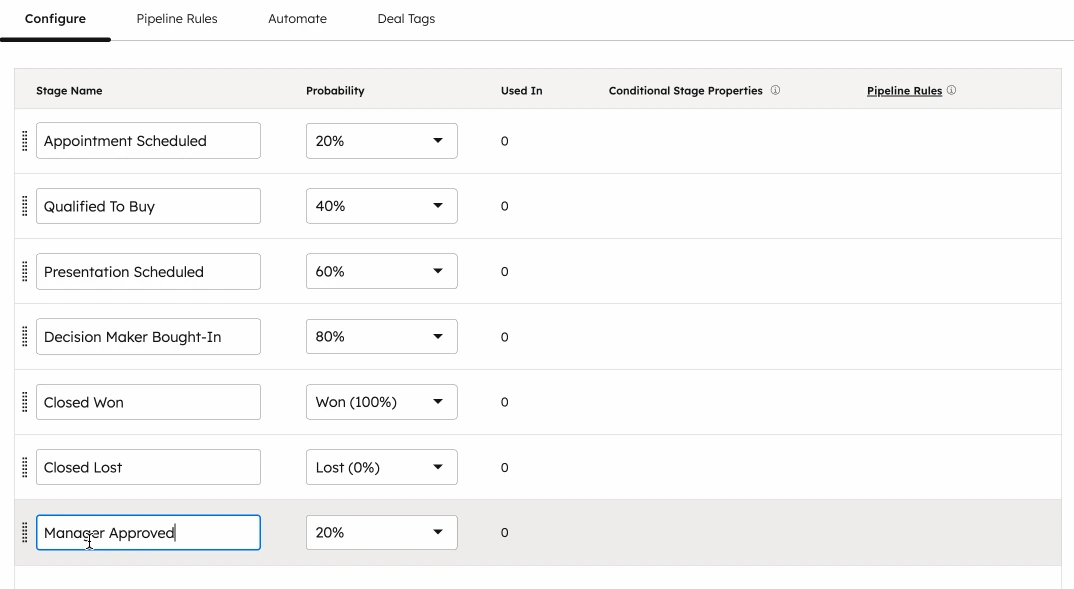
The visible stage list includes probabilities and the Manager Approved stage, illustrating the stage controls and ordering. Screenshot source Set stage probability where applicable
For deal stages, review the probability associated with each stage and update it to reflect the stage configuration your team intends to use. HubSpot uses deal stage probability to determine weighted amount in board view by multiplying the total amount in a stage by its probability. Do not treat an example percentage as a recommendation for your business.
Put stages in process order and save
Reorder the stages so they follow the sequence a deal takes through the sales process. In the visible example, Manager Approved is shown after Closed Lost, but that screenshot is a particular configuration. Use the order that fits your process. Save the stage changes using the editor’s save control.
How does this HubSpot Sales Hub setup work in practice?
Configure distinct stages for different sales processes
A growing business maintains a short direct sales process alongside a longer enterprise wholesale pipeline in HubSpot Sales Hub.
| Choice | Why it matters | How to check |
|---|---|---|
| List the stages for each process before editing | Comparing the sequences reveals whether the teams actually follow different workflows. | Each process has an ordered stage list documented for review. |
| Keep one pipeline if the stages are shared | Different teams alone do not require separate pipelines when the process is the same. | The stage sequences are the same across the teams using the pipeline. |
| Create or configure a separate pipeline if stages differ | The wholesale process in this hypothetical scenario includes steps that the short direct process does not. | The chosen pipeline contains the distinct stages needed by that process. |
| Review probabilities and order with sales users | Probability affects weighted amounts, and stage order should match how deals move through the process. | Sales users confirm both the sequence and the configured probability values. |
Save pipeline adjustments, then determine whether access permissions need updating for sales representatives handling specific product lines.
How do you verify your result in HubSpot Sales Hub?
The selected deal pipeline now has a stage list arranged around the sales process you defined. Stage probabilities also affect the weighted amount displayed in board view, so interpret that amount in light of the probability values configured for the stages.
| Step | What you should see |
|---|---|
| Open the deal pipeline settings | The Deals pipeline settings are open and the pipeline whose stages you intend to edit is selected. |
| Choose the pipeline to update | The selected pipeline name and existing stage list match the process you intend to configure. |
| Add or edit stage names | Every stage has a name that your users can distinguish, and the list contains the stages needed for this sales process. |
| Set stage probability where applicable | The probabilities shown in the stage list have been reviewed and match the values your team chose for each deal stage. |
| Put stages in process order and save | The list follows the intended process order, and the editor confirms or retains the changes after saving. |
Related HubSpot Sales Hub guides include How to add a deal to a HubSpot Sales Hub pipeline and How to add line items to a deal in HubSpot.
Which official HubSpot Sales Hub sources were checked?
Every step and limit in this HubSpot Sales Hub guide was verified against official documentation on 21 Nov 2026 following how we check figures, alongside more walkthroughs in our HubSpot Sales Hub tutorials hub:
How do you troubleshoot common HubSpot Sales Hub issues?
Why can’t I edit the pipeline stages?
Creating or editing pipelines and stages requires Edit property settings permissions. Ask an account administrator to confirm your permission if the stage controls are unavailable.
Should each team have its own pipeline?
Use separate pipelines when the sales processes have different stages. If teams follow the same stages, the source guidance recommends one shared pipeline with access managed through user permissions.
What does a deal stage probability affect?
HubSpot uses the stage probability to calculate weighted amount in board view. It multiplies the total amount in a stage by that stage’s probability. The source does not define a probability that is right for every business, so use values your team has established.
 Reviewed byDanny Kirk
Founder of ReddiReach.
 Checked byAndrés Felipe
Digital designer and marketer.
Every figure is checked against the vendor's own page. Read our editorial standards.