
Key Takeaways
- Set up list- and segment-triggered flows under Flows > Create flow > Build your own via the All triggers panel.
- Create your target list or segment beforehand and pause connected list flows prior to importing CSVs of existing subscribers.
- Create a custom flow, pick Added to list or Added to segment, set Re-entry criteria, and confirm the trigger.
- Check the saved trigger card at the top of the flow canvas to confirm the target audience and Re-entry criteria rule.
You can start automated welcome, retention, and lifecycle sequences in Klaviyo whenever a profile joins a list or newly qualifies for a segment. CRM teams use trigger-level re-entry criteria to decide whether contacts enter once, every time they re-qualify, or after a set cooldown window.
For plan limits and team seat pricing behind this workflow, read our Klaviyo review or connect Klaviyo to AI agents in Klaviyo API and MCP.
Key steps
What do you need before starting in Klaviyo?
Klaviyo requires the following workspace setup before you begin:
- An existing subscriber list or dynamic segment in Klaviyo whose new entrants should start the automation.
- Awareness of scheduled CSV list imports so active list-triggered welcome flows can be turned off beforehand if needed.
How do you complete the steps in Klaviyo?
Follow these 4 steps in Klaviyo in order:
Create a custom flow from the Flows tab
Open the Flows tab in Klaviyo, click Create flow, and select Build your own. Enter a clear flow name and click Create flow to launch the flow builder canvas.
Starting with Build your own opens full trigger selection before any messages go live. Existing flows migrated automatically to the updated re-entry model without changing send frequency unless you edit their settings.
Choose the Added to segment or Added to list trigger
Select All triggers in the trigger panel, click Added to segment or Added to list, and pick the target segment or list that initiates the flow.
Added to list starts when someone joins a list via form or CSV import, whereas Added to segment fires only when a profile was previously outside the segment and an organic property or event change qualifies them. Duplicate events while already in the segment do not re-trigger entry.
Configure Re-entry criteria in the trigger panel
Set Re-entry criteria in the trigger settings panel to No re-entry (default for new list and segment flows, suited for welcome or compliance emails), Allow re-entry (for repeating lifecycle segments), or Allow re-entry after a time period (for retention and winback cooldowns).
Re-entry criteria serves as the single source of truth for entry frequency across list, segment, metric, and date flows, removing the need for separate has-not-been-in-flow filters.
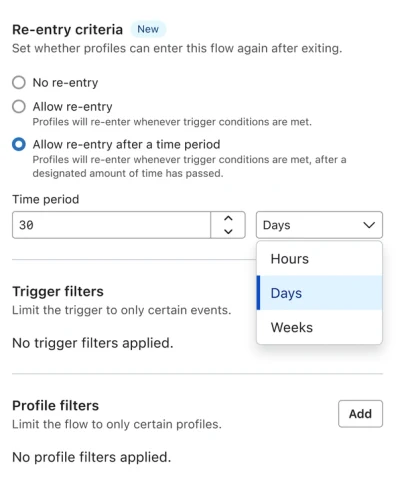
Select No re-entry, Allow re-entry, or Allow re-entry after a time period inside the trigger settings panel. Screenshot source Save the trigger and safeguard imports and rule edits
Click Save, then click Confirm and save to lock in the trigger before adding time delays and messages on the canvas.
Remember three runtime behaviors: segment-flow recipients must still belong to the segment when each message sends; CSV list imports trigger active list-based flows unless paused first; and manual segment rule edits require using add past profiles to queue existing members.
How does this Klaviyo setup work in practice?
Worked example: 90-day recurring winback flow for lapsing customers
A retention team wants subscribed buyers entering a lapsing segment to receive a winback sequence at most once every 90 days.
| Choice | Why it matters | How to check |
|---|---|---|
| All triggers > Added to segment > Lapsing Subscribed Buyers | Starts the flow organically when a customer's order recency crosses into the lapsing segment. | Trigger card shows Added to segment for Lapsing Subscribed Buyers. |
| Re-entry criteria set to Allow re-entry after a time period (90 days) | Lets repeat customers re-enter in future quarters while blocking back-to-back winback emails. | Trigger settings display the 90-day re-entry window. |
| Send-time segment membership check across timed follow-up emails | Automatically skips later winback messages if the shopper places an order and leaves the segment. | Buyers who reorder exit the segment before Email 2 sends. |
After clicking Save and Confirm and save, the team activates two winback emails and confirms re-qualifying profiles respect the 90-day cooldown.
How do you verify your result in Klaviyo?
Inspect the trigger card at the top of your flow builder canvas to confirm the right list or segment and Re-entry criteria are active. Next, build your message sequence, pause list flows ahead of bulk CSV imports, and use add past profiles if you manually revise segment rules.
| Step | What you should see |
|---|---|
| Create a custom flow from the Flows tab | The flow builder canvas opens with your named flow and displays the trigger setup panel. |
| Choose the Added to segment or Added to list trigger | The trigger sidebar displays your chosen list or segment as the flow initiation source. |
| Configure Re-entry criteria in the trigger panel | The Re-entry criteria setting shows No re-entry, Allow re-entry, or your chosen minimum time window. |
| Save the trigger and safeguard imports and rule edits | The top trigger card on the canvas displays your connected list or segment and active re-entry rule. |
Related Klaviyo guides include How to create and filter dynamic audience segments in Klaviyo and How to create and publish website sign-up forms in Klaviyo.
Which official Klaviyo sources were checked?
Every step and limit in this Klaviyo guide was verified against official documentation on 27 Nov 2026 following how we check figures, alongside more walkthroughs in our Klaviyo tutorials hub:
How do you troubleshoot common Klaviyo issues?
Why did editing segment rules or manually adding a profile not start my flow?
Flows only trigger when organic profile or event updates change list or segment membership. Manual segment edits, manual profile additions, list merges, and no-trigger integrations do not start entry; use add past profiles to queue eligible existing members after editing a segment.
Will importing a CSV of subscribers trigger my list-triggered welcome series?
Yes, importing profiles into a list triggers any active list-triggered flows connected to that list. Turn off connected list flows before importing if existing subscribers should not enter your welcome series.
Did the Re-entry criteria update change how often my existing flows send?
No, existing flows kept their prior behavior automatically: unfiltered list and segment flows mapped to No re-entry, unfiltered metric flows mapped to Allow re-entry, and X-day exclusions mapped to Allow re-entry after X days. Frequency only changes if you edit Re-entry criteria.
 Reviewed byDanny Kirk
Founder of ReddiReach.
 Checked byAndrés Felipe
Digital designer and marketer.
Every figure is checked against the vendor's own page. Read our editorial standards.